Get your WOOFi stake and vault back to your wallet
WOO staked on WOOFi (Arbitrum), USDC rewards you never claimed, money in the ETH vault that was settled but never collected: three taps on the official site, each one an ordinary transaction, and the money goes straight back to your wallet.
- Transactions
- 1–3 (depending on what you have). Ordinary transactions, no approvals
- Fee
- About 0.00002 ETH for all three, a few cents, paid from the ETH in your wallet on Arbitrum
- Time
- About 5 minutes, no waiting for a settlement
- You need
- At least 0.0002 ETH on Arbitrum in your wallet. Below that, the official site won't let you continue
Real-world tests
- 2026-10-29 Recovered with the Binance wallet following this guide; all three transactions arrived. After connecting you may land on the price chart trading page, and the two boxes showing 0 on the vault page are easy to misread. Both are now covered in the guide.
Know the drill? Everything on one card
Route: woofi.com/stake → Claim the rewards → Unstake everything → Earn at the bottom → My vaults → the ETH card on Arbitrum → WITHDRAW tab → WITHDRAW next to Available for Withdrawals.
Three transactions: claimRewards to 0xa9E2…24Fb; unstake (all) to 0x2CFa…d8e2; withdraw to 0xE77A…Ad6a. All send 0 ETH, need no approval and no message signature.
Your numbers: claim your unclaimed rewards, unstake your staked WOO WOO, collect the ETH you can collect from the vault ETH from the vault.
Gotchas: don't tap Compound or auto-compound. For the vault, tap the small WITHDRAW, not the big button. With less than 0.0002 ETH on Arbitrum, the official site won't let you continue.
Open the official site in your wallet app
- First tap this address to copy it:
- Below is how it goes in the Binance wallet, one picture per tap. The pictures show the Chinese Binance app; the English one has the same layout. In another wallet, paste this address into its DApp browser.
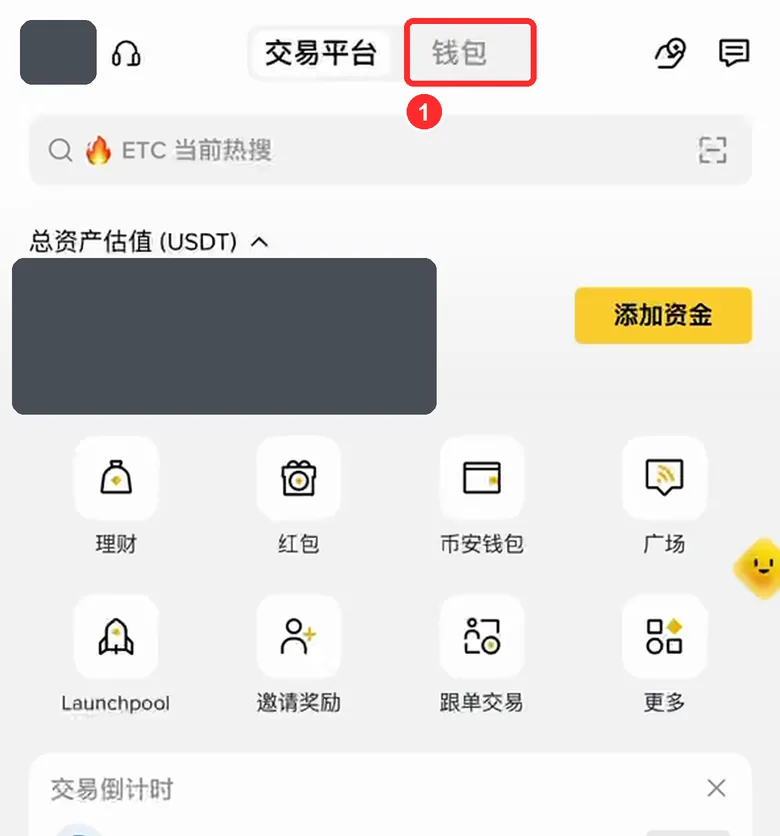
- Open the Binance app and tap Wallet at the top (the balance in the picture is hidden)
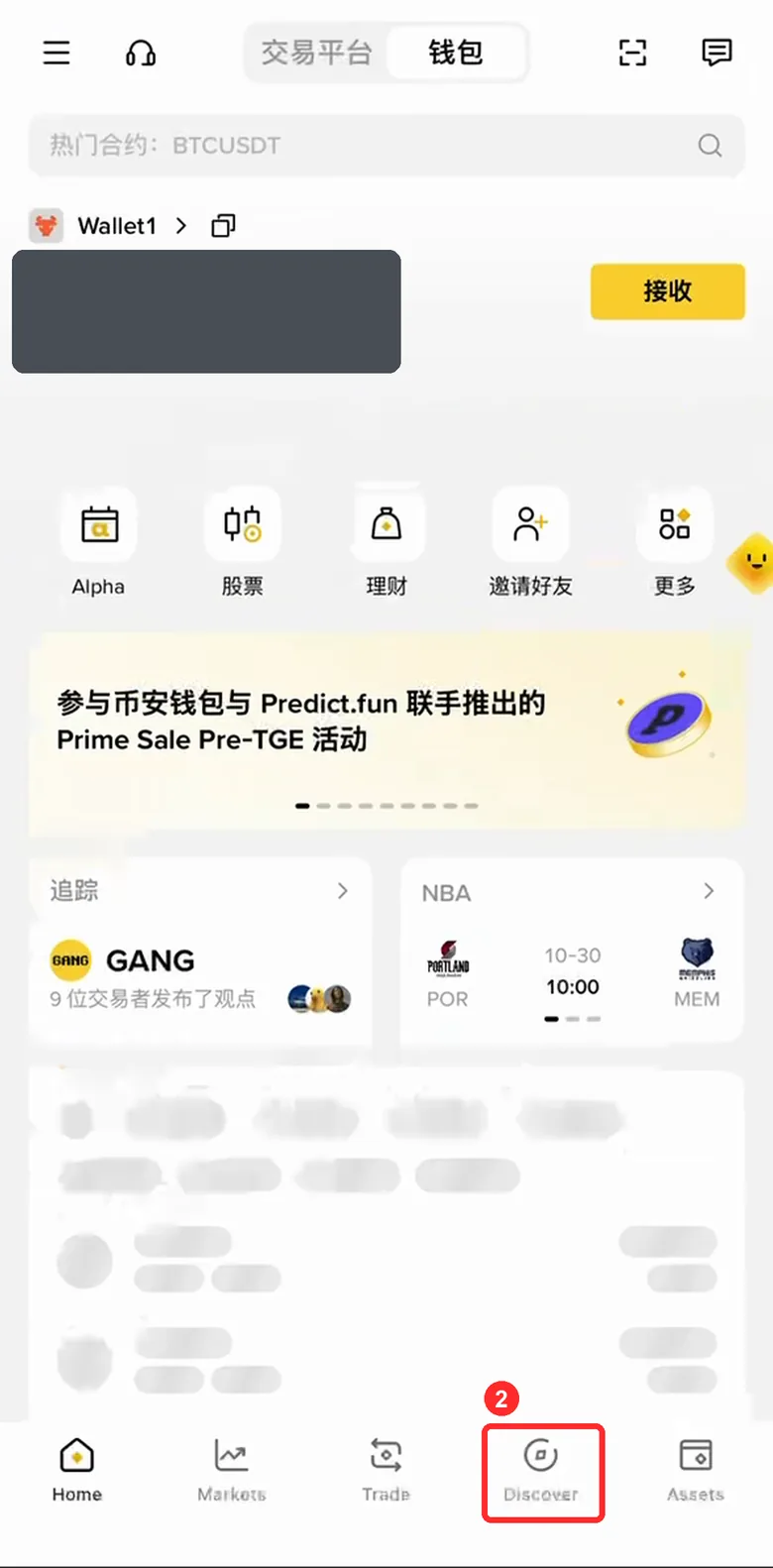
- Tap Discover at the bottom. The wallet selected at the top left must be the one holding this money (for example Wallet1). If it isn't, tap it to switch
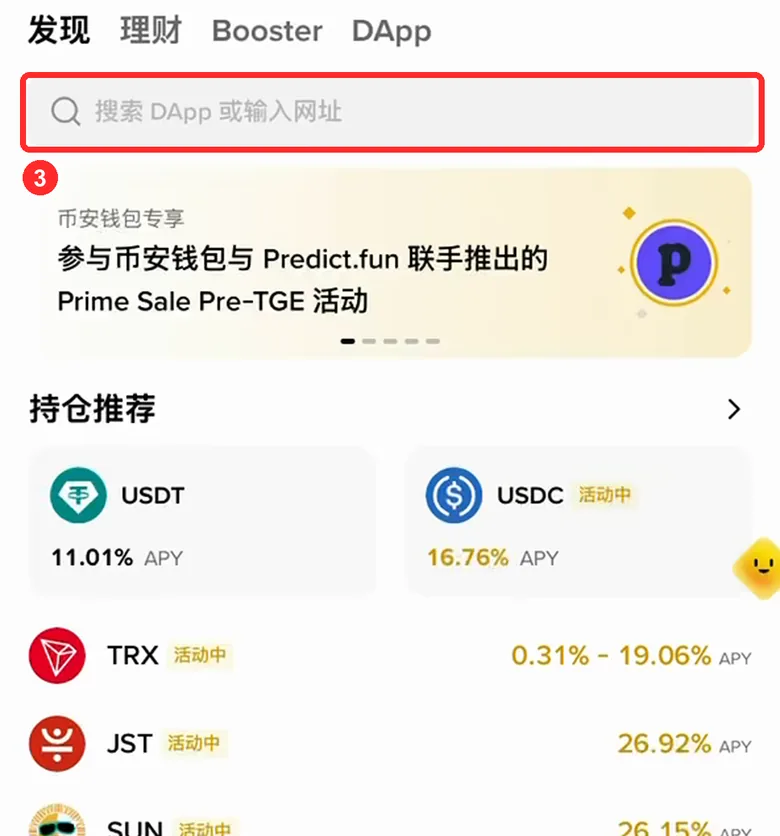
- Tap the search box at the top (Search DApp or enter URL)
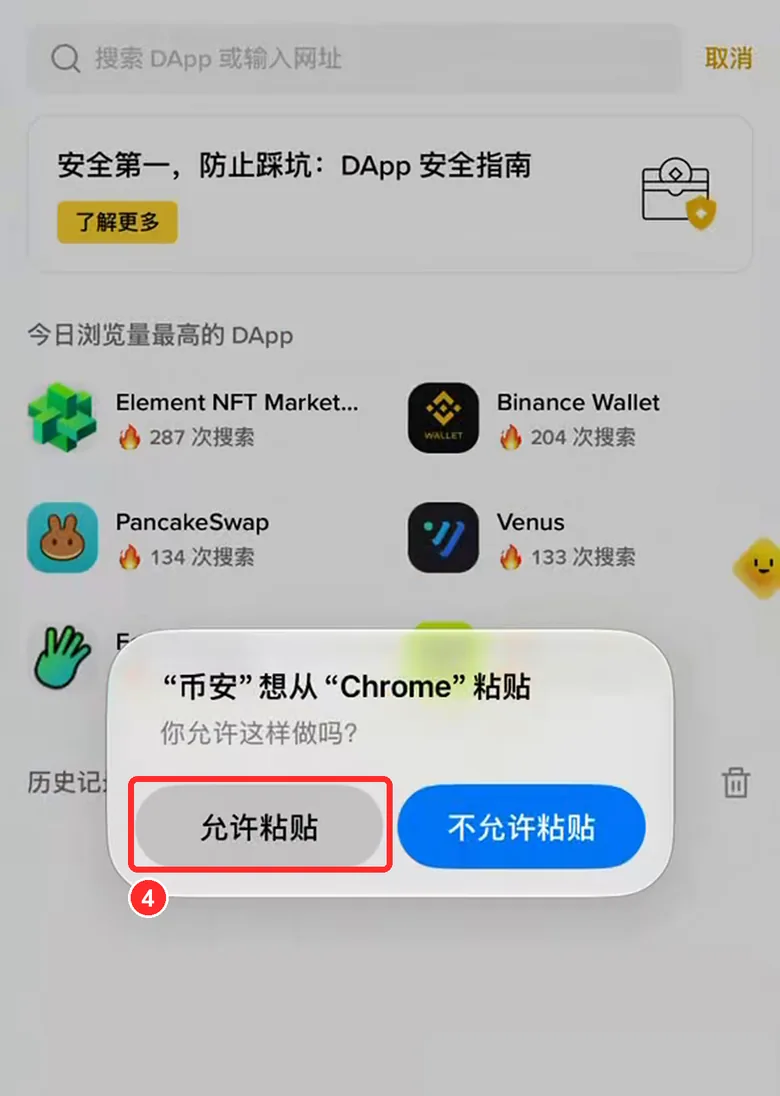
- An iPhone asks whether to allow pasting: tap Allow Paste (Android phones skip this)
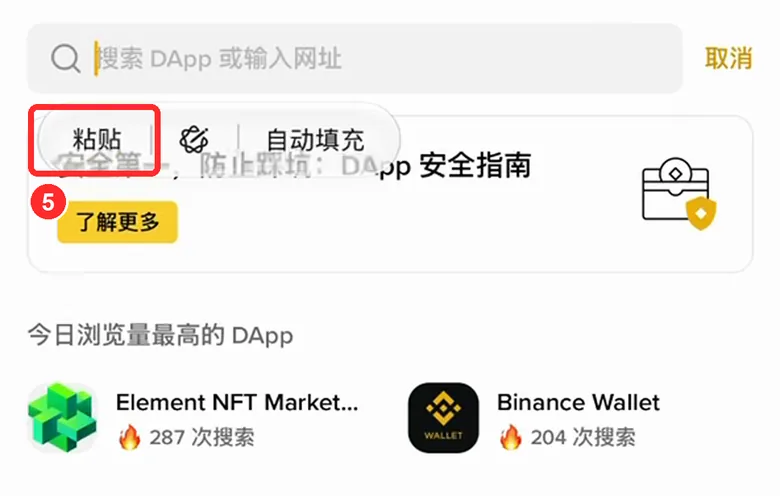
- Press and hold the search box, then tap Paste
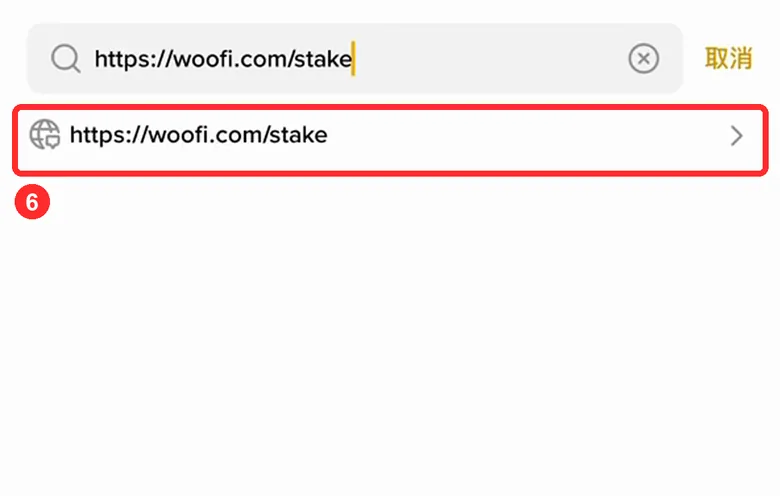
- Tap the row that appears below: woofi.com/stake
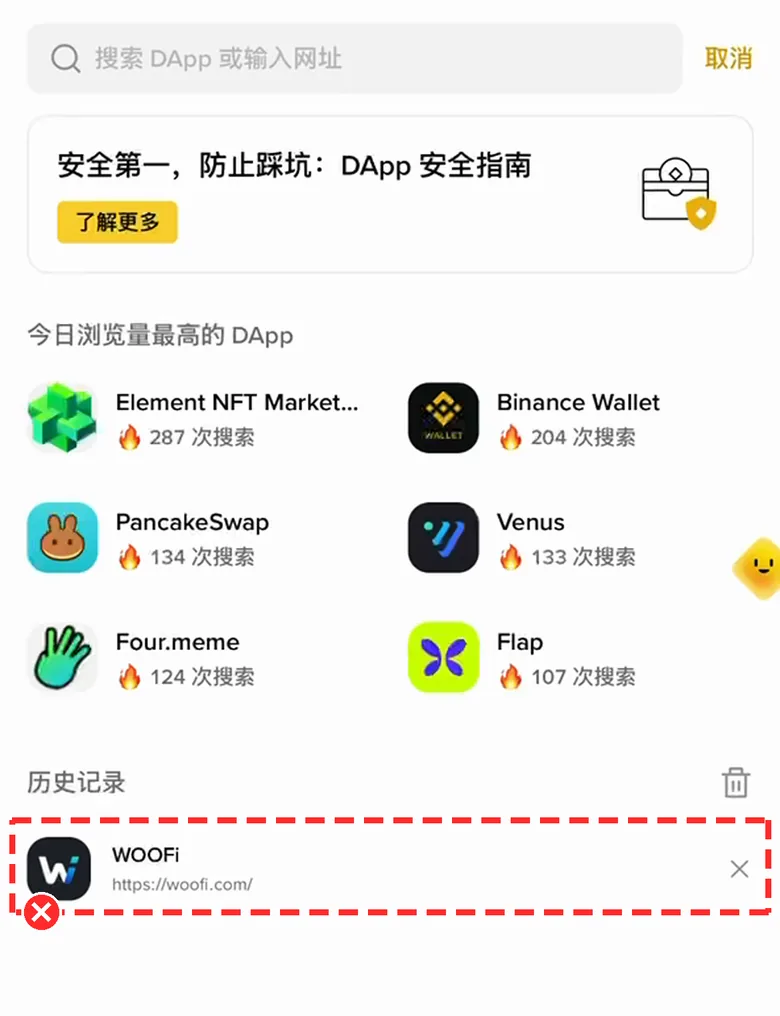
Don't tap WOOFi under History: it only saved the home page, which opens the intro page and costs you three extra taps
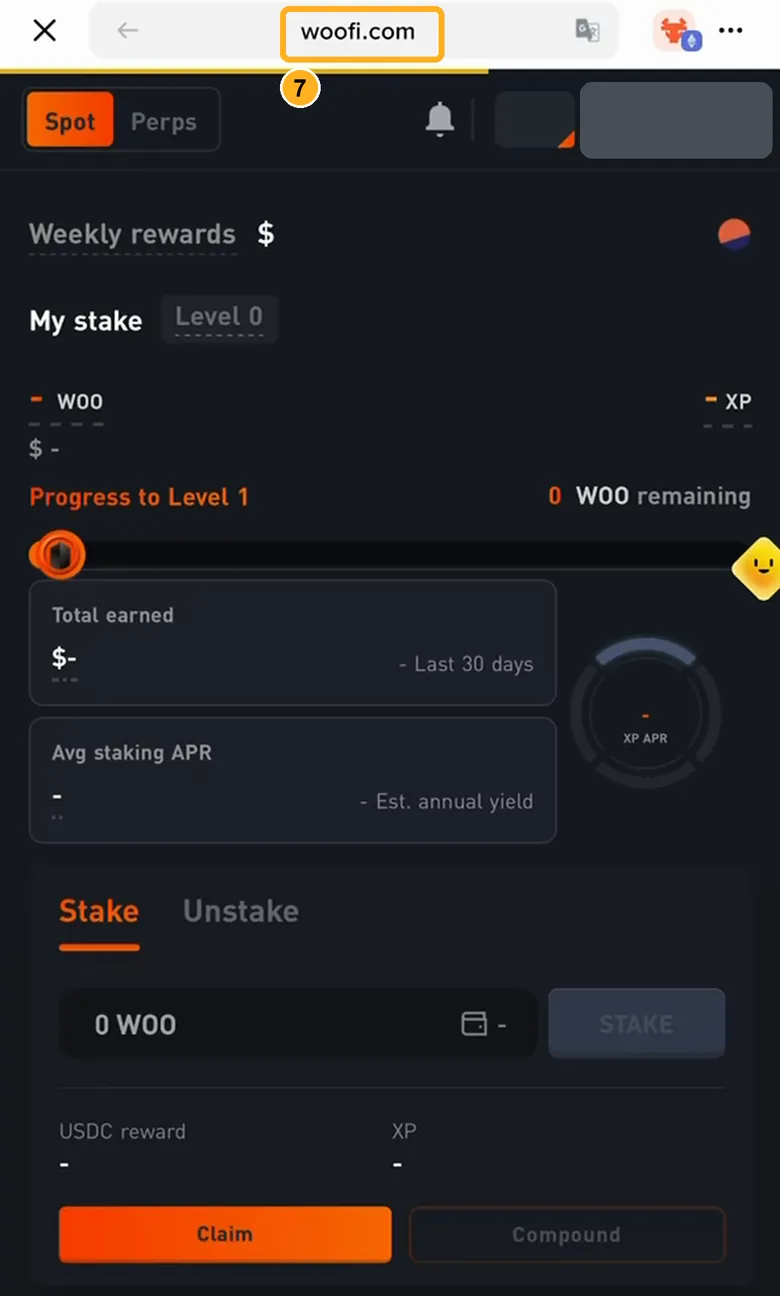
- It opens straight on the staking page. Check that the top says woofi.com: one extra letter or a missing dot means stop
Typing the address brings up search results
Include https:// and type the full address: .
A WE'RE SORRY message says your region isn't supported
Stop here. WOOFi doesn't serve your region, and this guide won't help you get around regional restrictions. You can ask in WOOFi's official Discord (see below).
Not sure this is the official site
Look at the address bar: the domain must be exactly woofi.com. If it isn't, close the page and type the address yourself. Don't tap links other people send you.
Your bookmark says fi.woo.org
That's WOOFi's old address and it now redirects to woofi.com. Go by what the address bar ends up showing: woofi.com.
You tapped WOOFi under History and got the intro page (big SWAP AND EARN headline, a LAUNCH APP button)
Tap the orange LAUNCH APP in the middle. It opens the price chart trading page first; then tap the three lines at the top left → Stake to reach the staking page. Next time, paste the full address instead of using History.
Holding the search box doesn't show Paste
Come back to this page and tap the address again to copy it. On an iPhone, tap Allow Paste when asked. If it still doesn't work, type by hand.
Connect your wallet and switch to Arbitrum
Just connecting. No signature, no money moves
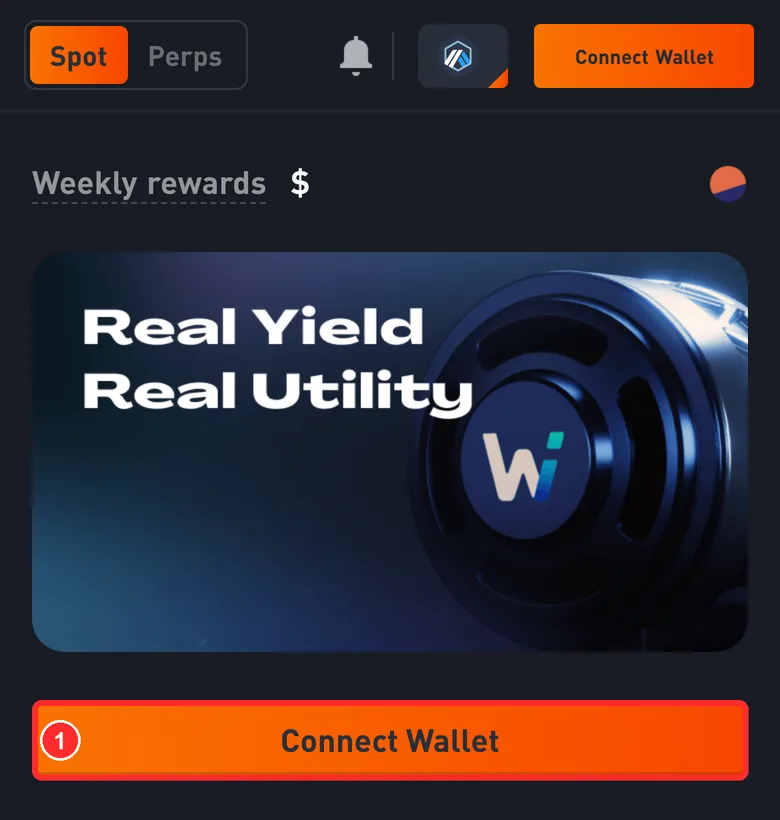
- Tap Connect Wallet (the one at the top right works too)
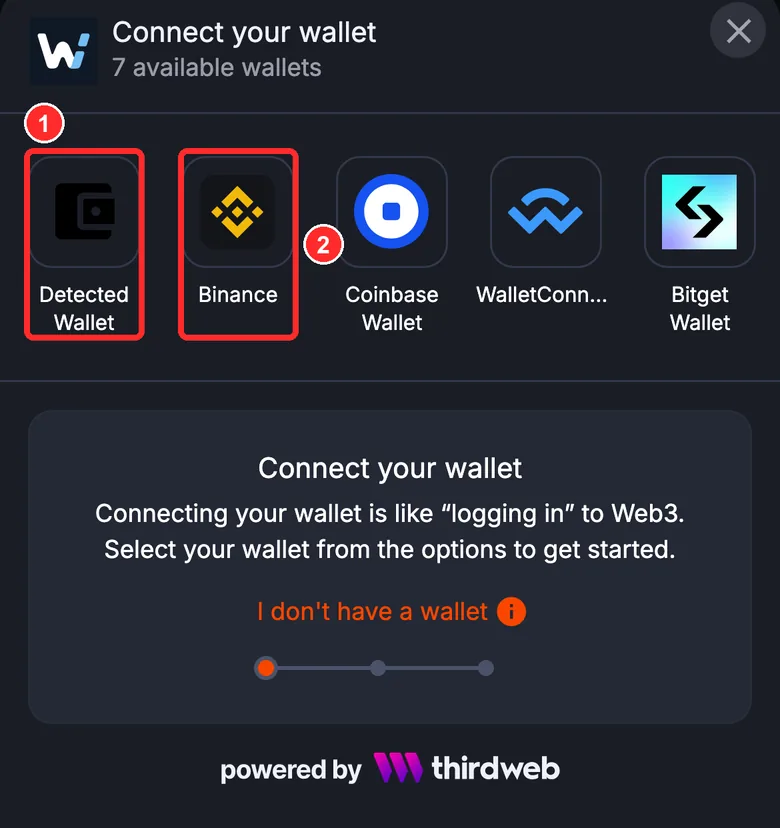
- Pick Detected Wallet: that's the wallet in the app you're using right now
- In the Binance app, Binance works too. When your wallet asks to connect and the request comes from woofi.com, tap Connect
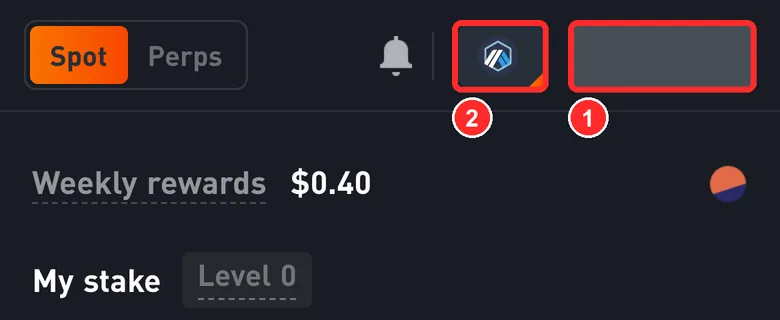
- Your address shows at the top right (hidden in the screenshot). It should be your own address
- This icon is the current network. Tap it
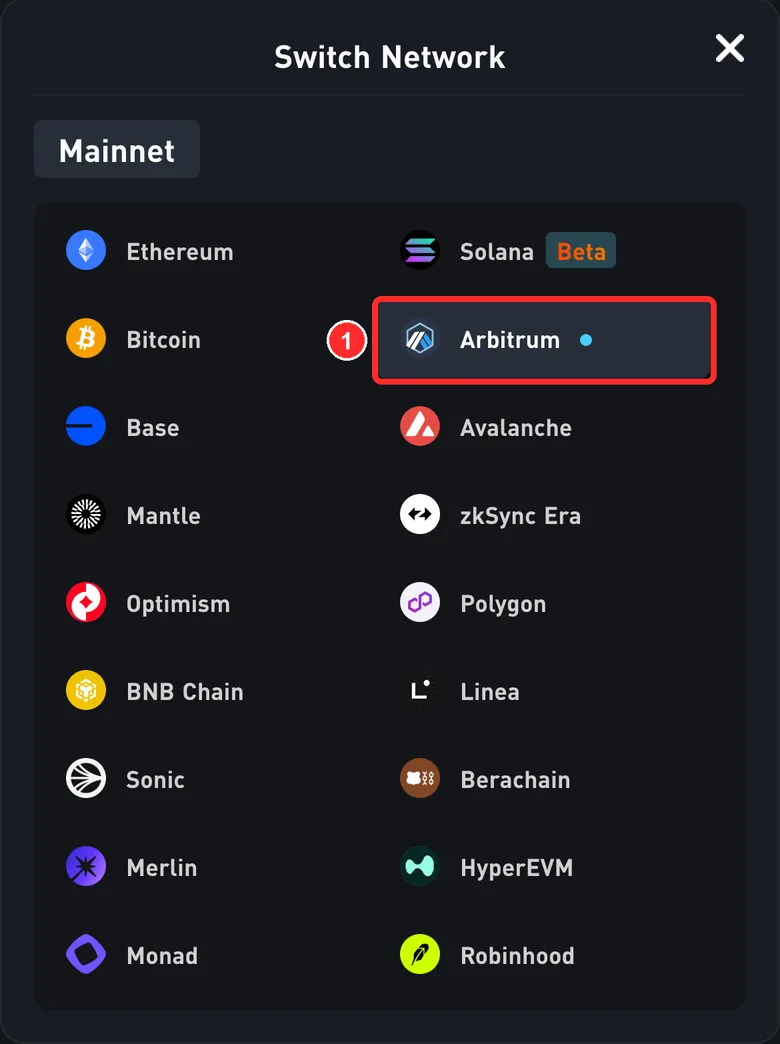
- Pick Arbitrum and confirm the network switch in your wallet. If it's already Arbitrum (a small dot after the name), close the menu with the × at the top right
If a WE'RE SORRY message says your region isn't supported when you connect, stop here. This guide won't help you get around regional restrictions.
After connecting, I see a price chart trading page, not the staking page
That's WOOFi's perpetuals trading page. Tap the three lines at the top left → Stake to get back to the staking page. If the top right says Connect Wallet, connect again.
Tapped Connect Wallet, but the wallet didn't ask to connect
Open the page inside your wallet app's own DApp browser (step 1). If Detected Wallet does nothing, reopen the page and try Binance.
The address at the top right isn't the one with the money
Switch to the wallet that holds this money in your wallet app, then connect again. Don't continue if the address doesn't match.
Your wallet asks you to sign a message while connecting
Tap Reject, close the page and check the address again. WOOFi doesn't need a signature to connect (its site code makes no signature request).
The page says Wrong Network at the top
Tap the network icon at the top right, pick Arbitrum and confirm the switch in your wallet.
A Blocked Address message appears
WOOFi blocked this address based on a sanctions list. This guide can't help.
Claim your rewards
This step moves your funds After you sign in your own wallet, WOOFi's contract carries it out. DeFiExit never touches your money.
Transaction 1
Only needed if you have unclaimed rewards
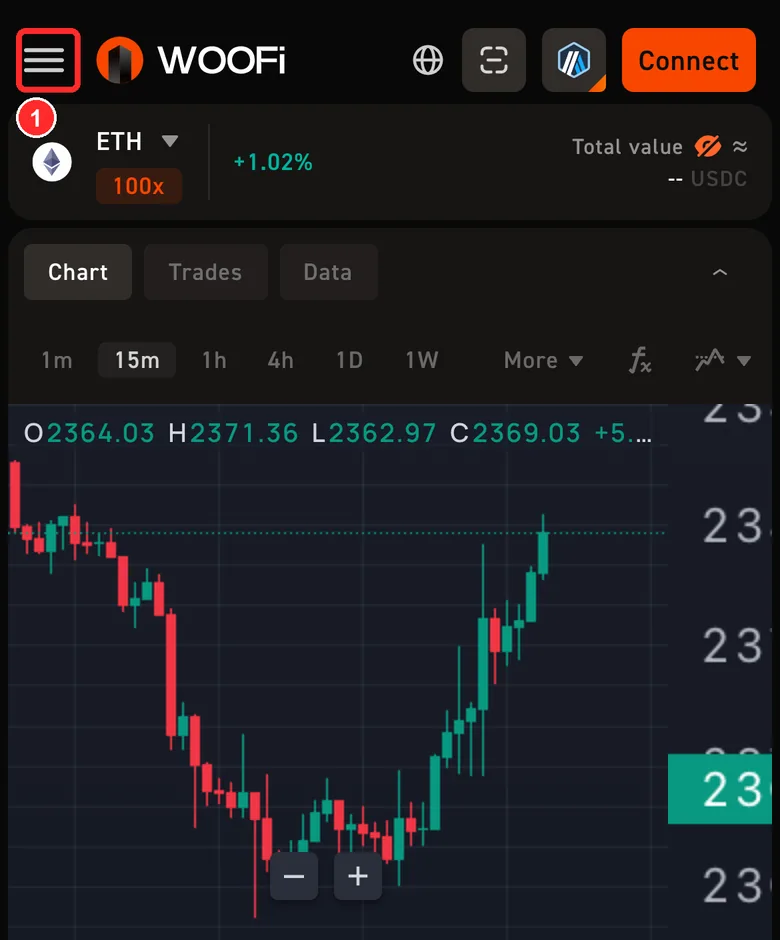 Seeing a price chart (three lines at the top left)? Two taps to get back to the staking page
- Tap the three lines at the top left
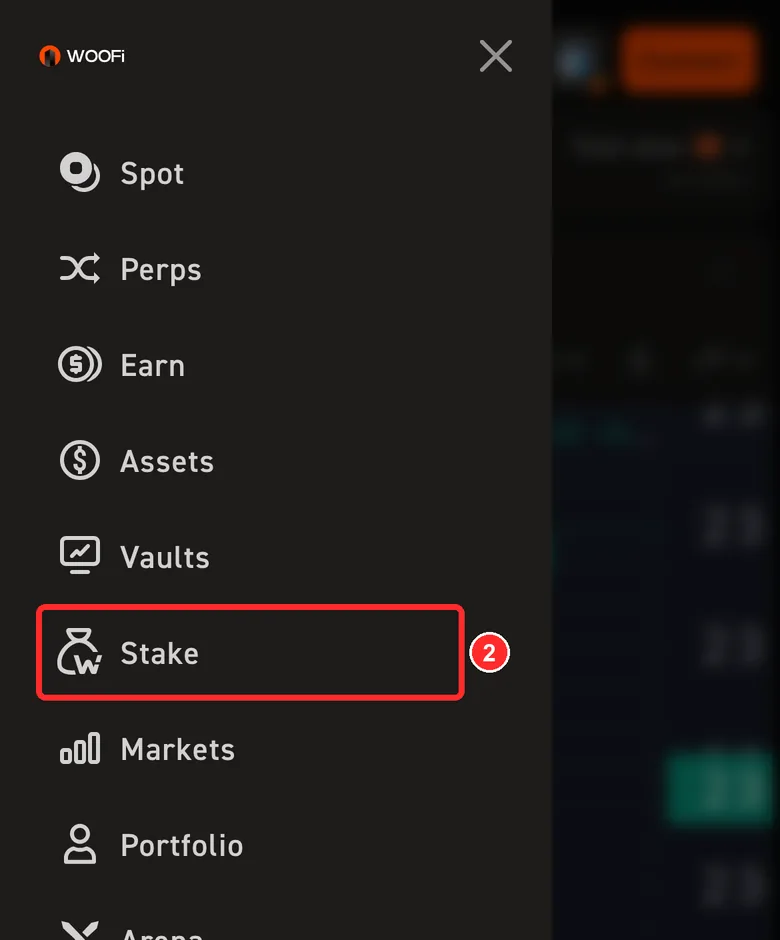
- Tap Stake to get back to the staking page, then carry on below
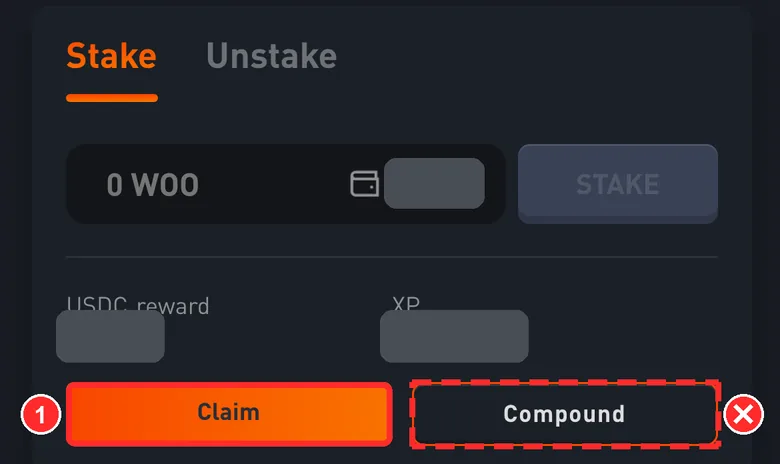
Scroll down to the Stake / Unstake box.
- Tap Claim (USDC reward above is what you haven't claimed. It's hidden in the screenshot and should be about your unclaimed rewards)
Don't tap Compound: it turns the rewards into WOO and stakes them again, the opposite of what you want
Before you confirm, check 3 things
After you tap Claim, your wallet asks you to confirm a transaction (in the Binance wallet it's titled Contract call). Check it against this list and tap each item once it matches.
See any of these? Tap Reject right away
- It asks you to send any tokens (an amount with a minus sign, or the words send or pay)
- It says Approve or Permit
- It asks you to sign a message (Sign)
- It doesn't come from woofi.com
These are normal
- The action line usually says claimRewards
- The amount you'll receive also lists a little USDC.e and ARB: this pays out several reward tokens at once (Binance's history shows 3 balance changes)
- The network fee comes out of your ETH on Arbitrum, under a cent
- Your wallet may warn that this is a contract call. If the site and the address both match, it's fine to continue
The page is a price chart and there's no Claim
You're on WOOFi's perpetuals trading page. Tap the three lines at the top left → Stake. Claim is on the staking page.
The page shows Cancelled · User denied transaction signature
You tapped Reject in your wallet, so nothing moved. Check again, then tap Claim once more.
The button says INSUFFICIENT GAS
The official site needs at least 0.0002 ETH on Arbitrum in your wallet. Send a little ETH to this wallet on Arbitrum first (0.0005 is plenty), then come back.
Tapped Compound by mistake
Your rewards were turned into WOO and added to your stake. Nothing is lost: they come out with the rest when you unstake in the next step.
The transaction failed with !COMPOUND
Auto-compound is on. While it's on you can't claim, and it can't be turned off for 7 days after you turn it on. Tap Stuck? at the top right to see your situation. If you're unsure, ask in WOOFi's official Discord.
The request goes to an address other than 0xa9E2…24Fb
Tap Reject right away.
Unstake your WOO
This step moves your funds After you sign in your own wallet, WOOFi's contract carries it out. DeFiExit never touches your money.
Transaction 2
Only needed if you have staked WOO
Seeing a price chart (three lines at the top left)? Two taps to get back to the staking page
- Tap the three lines at the top left
- Tap Stake to get back to the staking page, then carry on below
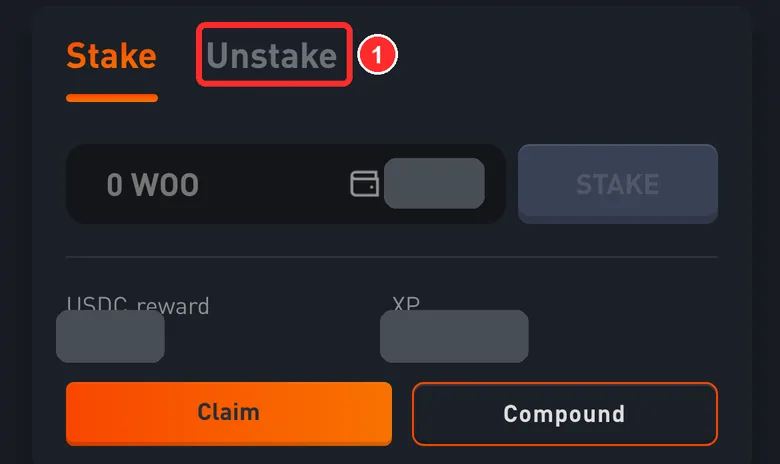
- On the staking page, tap the Unstake tab
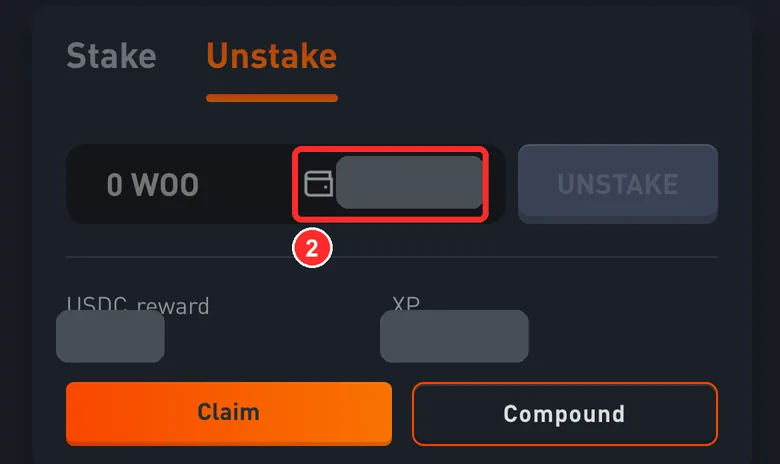
- Tap the number on the right of the input (all of your staked WOO, hidden in the screenshot). It fills in the full amount
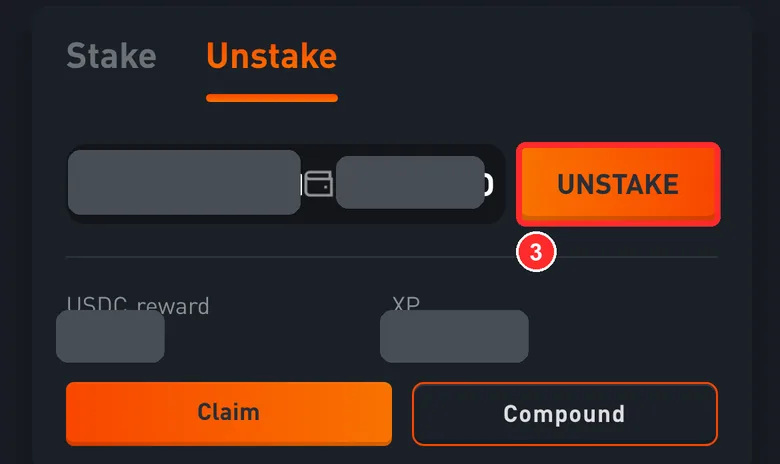
- With the amount filled in (about your staked WOO; the official site shows a few more decimals), tap UNSTAKE
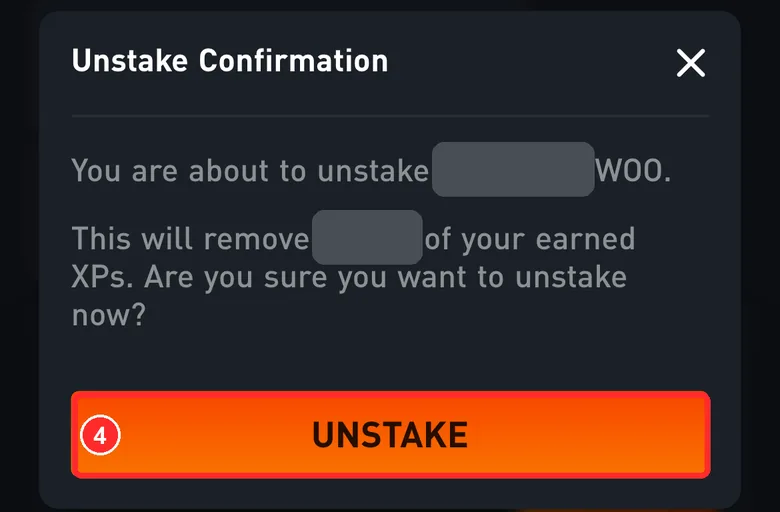
- In Unstake Confirmation, check the amount and tap UNSTAKE. Your wallet asks you to confirm a transaction: check it against the card below
It says your XP (points) will be removed. XP can't be traded and doesn't affect the money you get back
Before you confirm, check 3 things
After you tap UNSTAKE, your wallet asks you to confirm a transaction (in the Binance wallet it's titled Contract call). Check it against this list and tap each item once it matches.
See any of these? Tap Reject right away
- It asks you to send any tokens (an amount with a minus sign, or the words send or pay)
- It says Approve or Permit
- It asks you to sign a message (Sign)
- It doesn't come from woofi.com
These are normal
- The action line usually says unstake
- Unstaking has no lock-up period and no fee
The amount isn't everything
Tap the number on the right of the input to fill in the full amount. Typing it yourself tends to leave some behind.
The button says INSUFFICIENT BALANCE
The amount is more than you have staked. Tap the number on the right of the input to fill it in again.
The confirmation says your XP will be removed
XP is WOOFi's points system. It can't be traded, and losing it doesn't affect the money you get back.
The page shows Cancelled · User denied transaction signature
You tapped Reject in your wallet, so nothing moved. Check again, then tap UNSTAKE once more.
The request goes to an address other than 0x2CFa…d8e2
Tap Reject right away.
Collect the ETH from the vault
This step moves your funds After you sign in your own wallet, WOOFi's contract carries it out. DeFiExit never touches your money.
Transaction 3
Only needed if settled money is waiting for you in the ETH vault
Seeing a price chart (three lines at the top left)? Two taps to get to the Earn page
- Tap the three lines at the top left
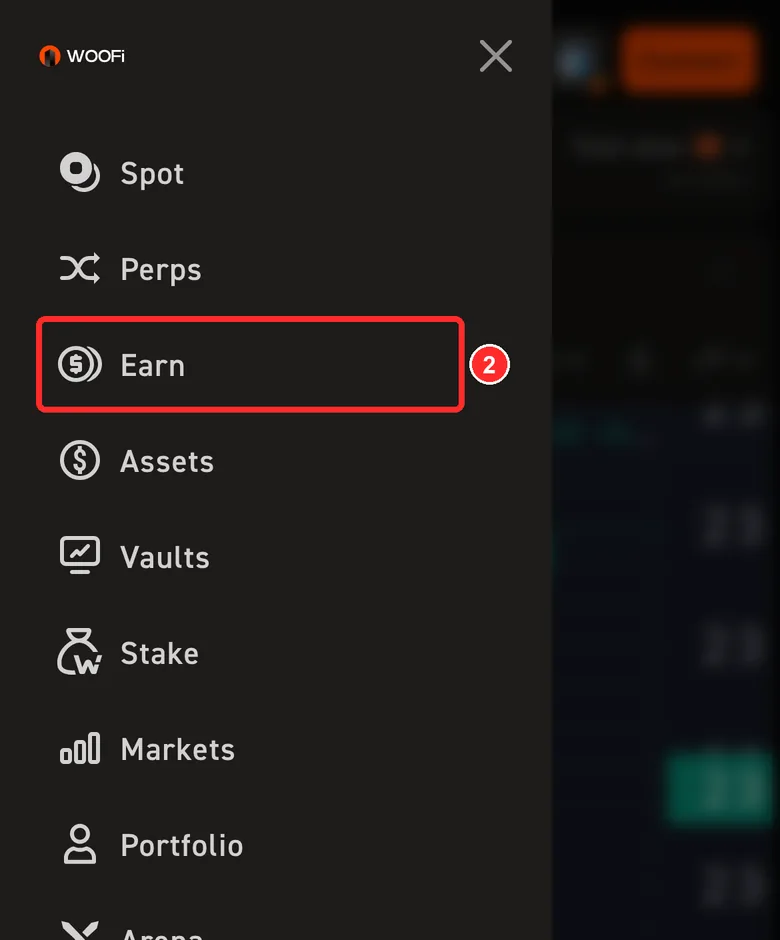
- Tap Earn. Once you're on the Earn page, carry on from picture 2 below
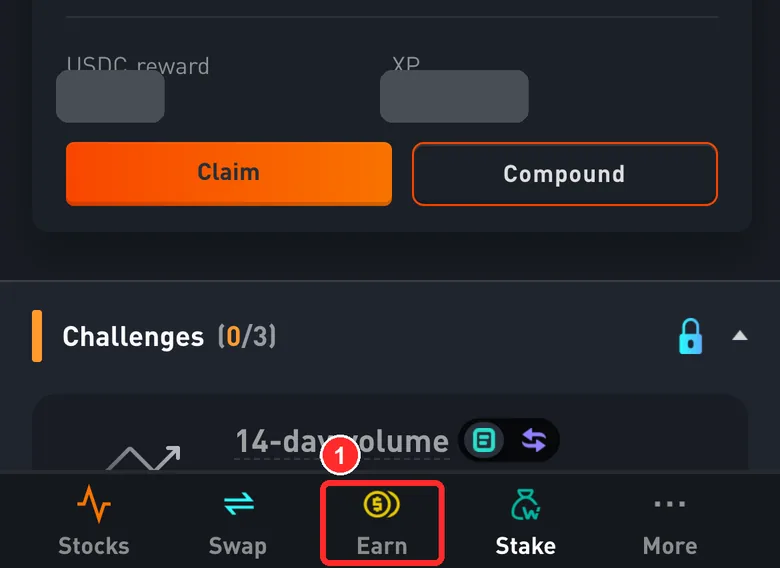
- At the very bottom of the staking page, tap Earn
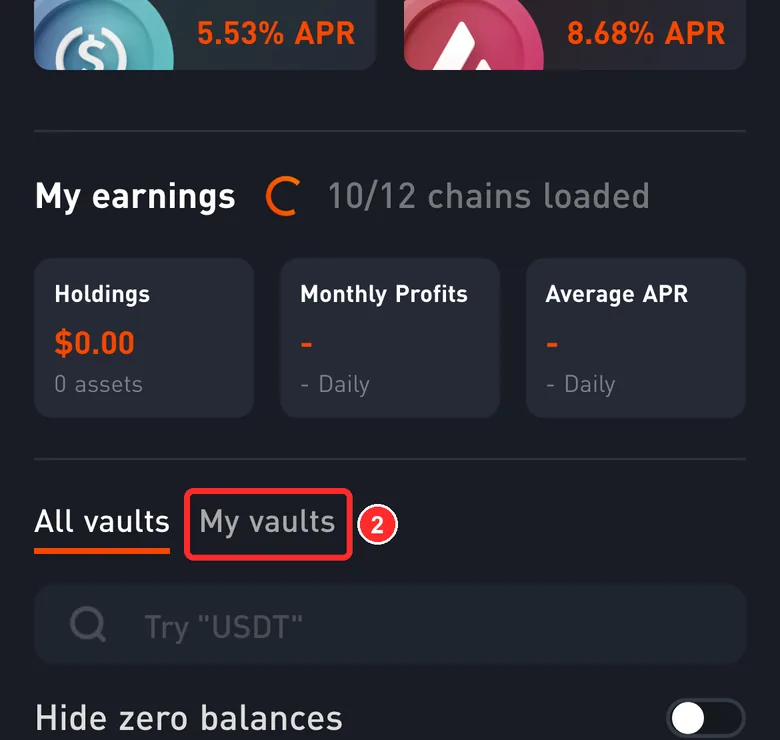
- Scroll down a little and tap My vaults (only the vaults you've put money in)
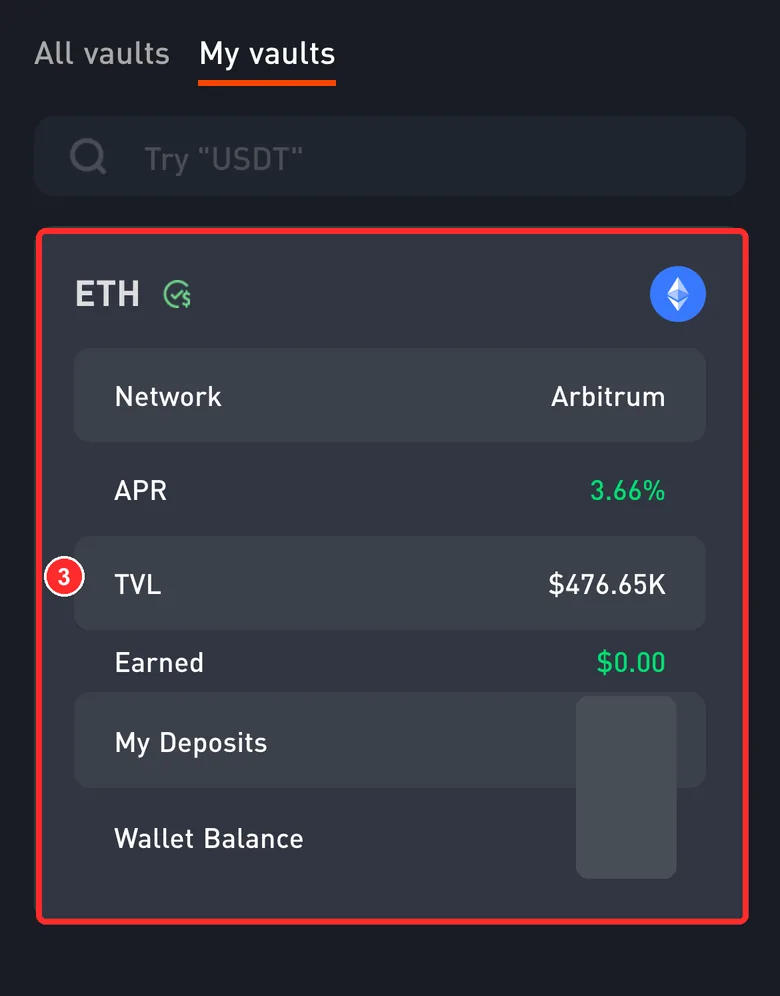
- Tap the ETH card on Arbitrum (My Deposits is your number, hidden in the screenshot)
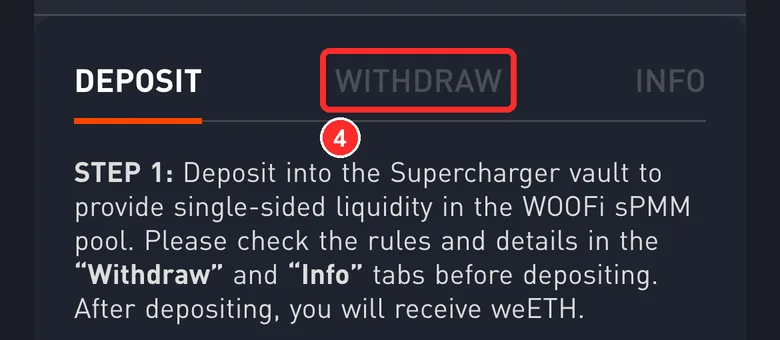
- The card opens on DEPOSIT. Tap the WITHDRAW tab next to it
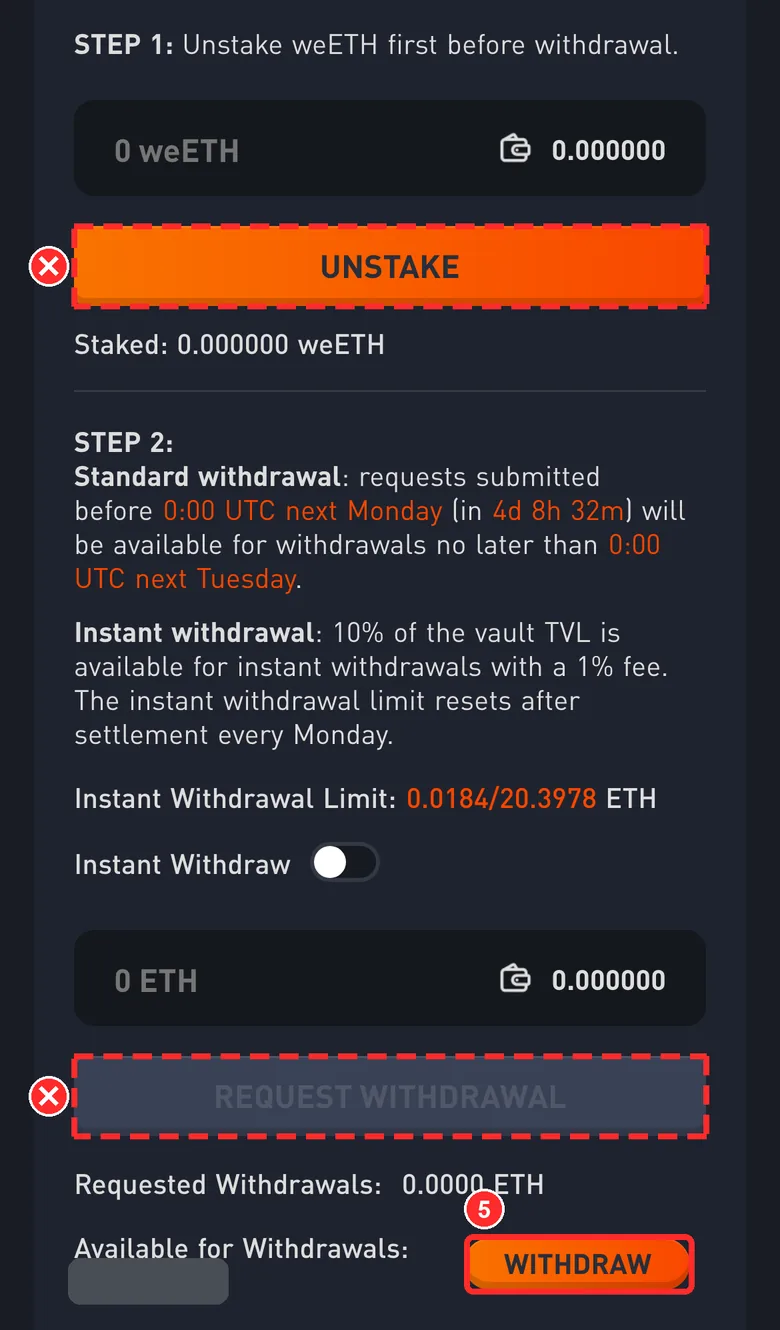
- Scroll to the last line, Available for Withdrawals (what you can collect, hidden in the screenshot; the page shows 4 decimals, about the ETH you can collect from the vault ETH), and tap WITHDRAW to its right
Leave the two boxes showing 0, the orange UNSTAKE and the grey REQUEST WITHDRAWAL alone
Settled money isn't sent to your wallet automatically. You have to tap this yourself, and this is the step many people miss.
Before you confirm, check 3 things
After you tap WITHDRAW, your wallet asks you to confirm a transaction (in the Binance wallet it's titled Contract call). Check it against this list and tap each item once it matches.
See any of these? Tap Reject right away
- It asks you to send any tokens (an amount with a minus sign, or the words send or pay)
- It says Approve or Permit
- It asks you to sign a message (Sign)
- It doesn't come from woofi.com
These are normal
- The action line says withdraw, and the raw data starts with 0x3ccfd60b
- You receive native ETH, not WETH. Binance's history calls it a redemption
Available for Withdrawals is 0
Either it's already been collected or it hasn't settled yet. Tap Stuck? at the top right for a live check.
The big REQUEST WITHDRAWAL button can't be tapped
That's expected: you don't need it. Tap the small WITHDRAW to the right of Available for Withdrawals.
My Deposits is more than Available for Withdrawals
Some of your money in the vault hasn't been requested yet. For now this guide only covers settled money waiting to be collected. For the rest, use Instant Withdraw on the WITHDRAW tab (arrives right away, 1% fee) or REQUEST WITHDRAWAL (free, but you wait until next Tuesday).
The page shows Cancelled · User denied transaction signature
You tapped Reject in your wallet, so nothing moved. Check again, then tap WITHDRAW once more.
The request goes to an address other than 0xE77A…Ad6a
Tap Reject right away.
Check that it arrived
Check that it arrived
- How long
- A few seconds after each transaction confirms
- Where to look
- Your wallet app → Assets, with the network set to Arbitrum
- What you should see
- About your staked WOO WOO, your unclaimed rewards and the ETH you can collect from the vault ETH more (whichever of these you had)
- On-chain record
- WOO comes from WOOFi's staking contract 0x2CFa…d8e2, reward tokens from WOOFi's reward contracts, ETH from WOOFi's vault withdrawal contract 0xE77A…Ad6a. Your address receives all of them
- If it hasn't arrived
- Tap Stuck? at the top right for a live check. If the transaction succeeded but you can't see the WOO, add the token in your wallet
Once it arrives, you're done. WOO is an ordinary token: keep it or swap it in your wallet
Can't see WOO in the wallet
Some wallets don't show new tokens on their own. Search for WOO (Arbitrum) in your wallet, or add it with the contract address 0xcafcd85d8ca7ad1e1c6f82f651fa15e33aefd07b.
What arrived is ETH, not WETH
That's normal: the vault withdrawal contract unwraps WETH and sends you native ETH.
Want to swap the WOO for USDC
The WOO is already in your own wallet, so you can use your wallet's built-in swap. This guide doesn't cover swapping. Check the quote and slippage before you swap.