Withdraw your DYORSwap liquidity to your wallet
If you added liquidity to DYORSwap's USDT/OKB pool, it won't come back on its own. The site's list often doesn't show it (it says No liquidity found), and withdrawing with the default settings fails. Follow this guide to find the pool, set slippage to 1% and withdraw, and your USDT and OKB go back to your wallet.
- Signature and transaction
- 1 signature (only for the LP you're withdrawing) and 1 transaction
- Fee
- Under $0.01, paid from the OKB in your wallet on X Layer
- Time
- About 5 minutes
- You'll need
- The OKX app, on the account that added the liquidity, with a little OKB on X Layer for the fee
Know the drill? Everything on one card
Route: in the OKX app, pick Web3 at the top → the explore tab at the bottom → paste https://dyorswap.finance/find/?chainId=196 in the search box → the third-party website result → Connect → OKX Wallet → Select a Token, pick USDT → Manage this pool → the gear, pick 1.0% → tap USDT/OKB → Remove → Max → Enable (signature) → Remove → Confirm (transaction).
One signature: an EIP-712 Permit on the DYOR LPs contract 0x35c185563dFd328256A80Aafc23822200719cD25. The spender is the router 0x1E690F24F704672e44255013C2cB22FC04c46036, and the amount is the LP you're withdrawing, not unlimited.
One transaction: removeLiquidityETHWithPermit to the router, sending 0 OKB.
Your numbers: what you can withdraw.
Pitfalls: this USDT is X Layer's old version (USDT_Bridged), and the pool isn't in the site's default list, so Your Liquidity says No liquidity found. Withdrawing first mints the protocol's fee LP, so you actually get about 0.5% less than the site estimates, more than the default slippage, and the router reverts with INSUFFICIENT_A_AMOUNT. That's why slippage has to be 1%. Don't tap Bridge.
Open DYORSwap in the OKX app
- First tap this link to copy it:
- Below is how it goes in the OKX app, one picture per tap. We tested the app in Chinese, so its pictures are in Chinese. If your app is in English, look for the button that does what each caption describes, and stop if you can't find it or what you see doesn't match.

- Reading this inside the OKX app? Once the link is copied, tap the × at the top left to close the page, and come back when you're done. Reading it in another browser? Just open the OKX app
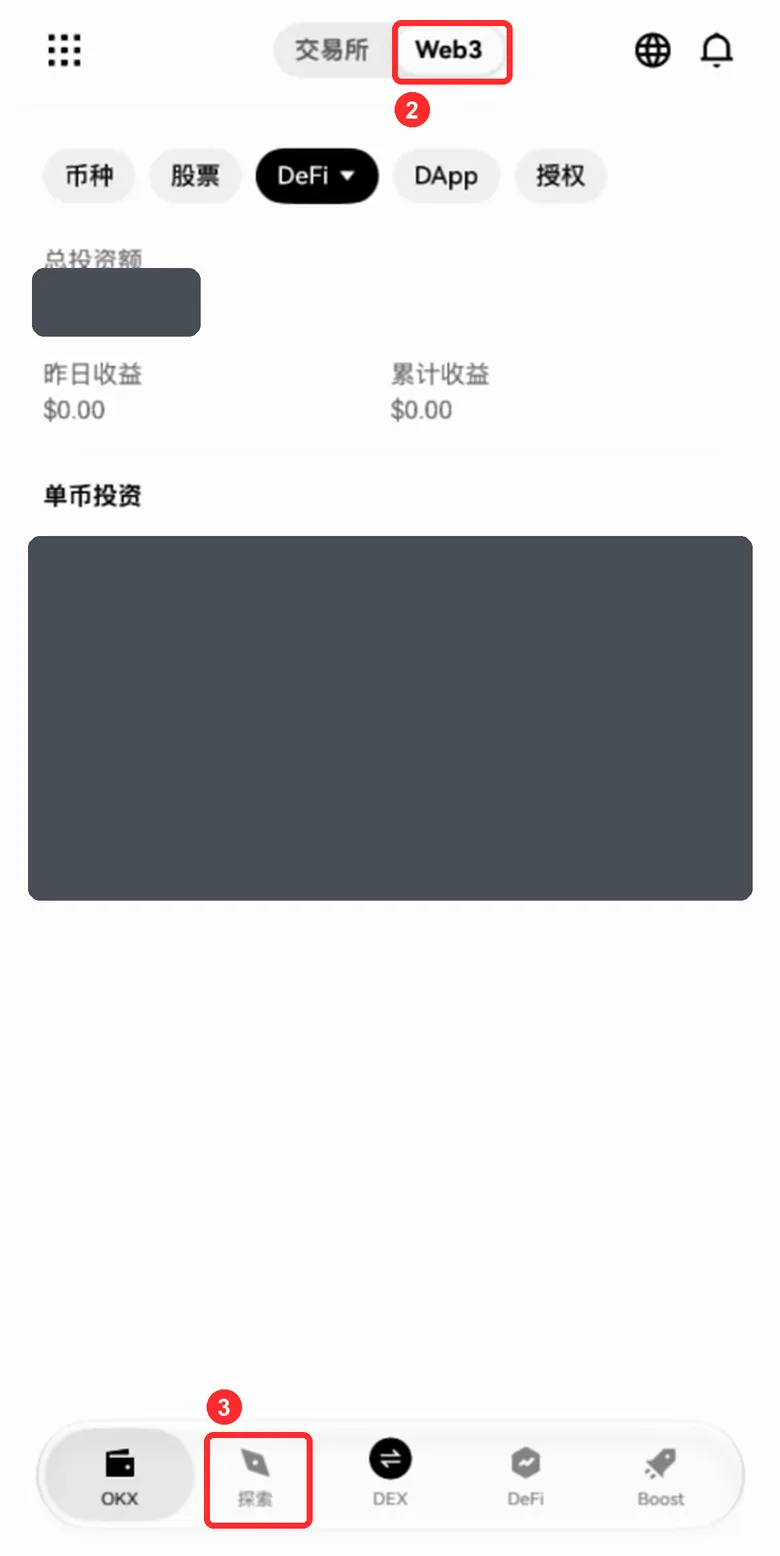
- Pick Web3 at the top
- Tap the explore tab, the second icon in the bottom bar. The amounts in the picture are hidden
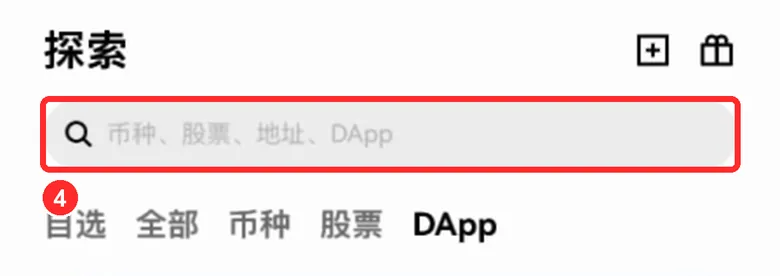
- Tap the search box at the top
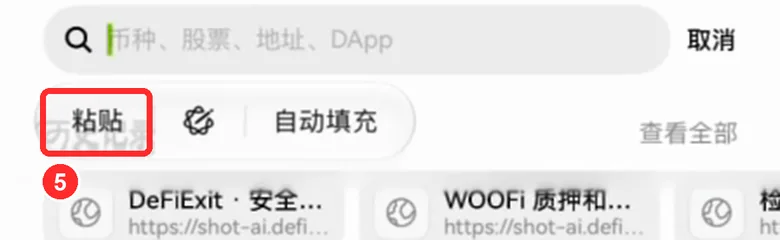
- Press and hold the search box, then tap Paste
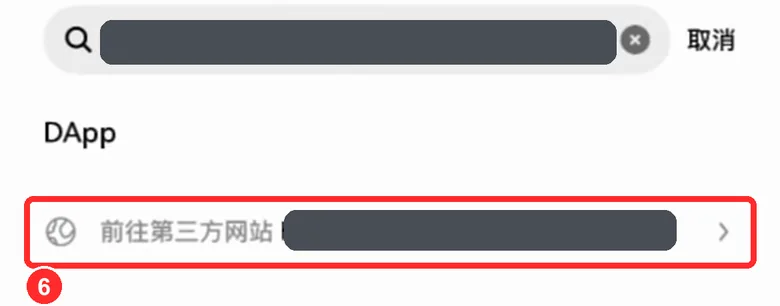
- Tap the third-party website result below it. The hidden part of the picture is a different link from our recording; yours must start exactly with https://dyorswap.finance/, and once it opens the address bar must say exactly dyorswap.finance, with nothing extra before or after
The search result says it's a third-party website
That's normal: the wallet labels every web address this way. Look at the address after it: it must start exactly with https://dyorswap.finance/, with a slash right after finance and nothing extra in between.
Holding the search box doesn't show Paste
Come back to this page and tap the link again to copy it. If your iPhone asks whether to allow pasting, allow it. Still nothing? Type by hand.
The wallet is on a different account from the one that added the liquidity
Go back to the wallet home, tap the small triangle next to the account name, switch to the account that added the liquidity (an OKX wallet can hold several), and start again. On the wrong account you won't find your pool.
I'm not using the OKX app, or I'm on a computer
This guide was written for the OKX app; we haven't checked other wallets or browser extensions. The web pages are the same, but the wallet pop-ups look different. If they don't match the check cards, don't sign: tap Stuck? at the top right and send us the report.
Connect your wallet and find your pool
Connecting is free and can't move your money
- DYORSwap can show in English or Chinese. The pictures are in English; to switch languages, tap the globe at the top.
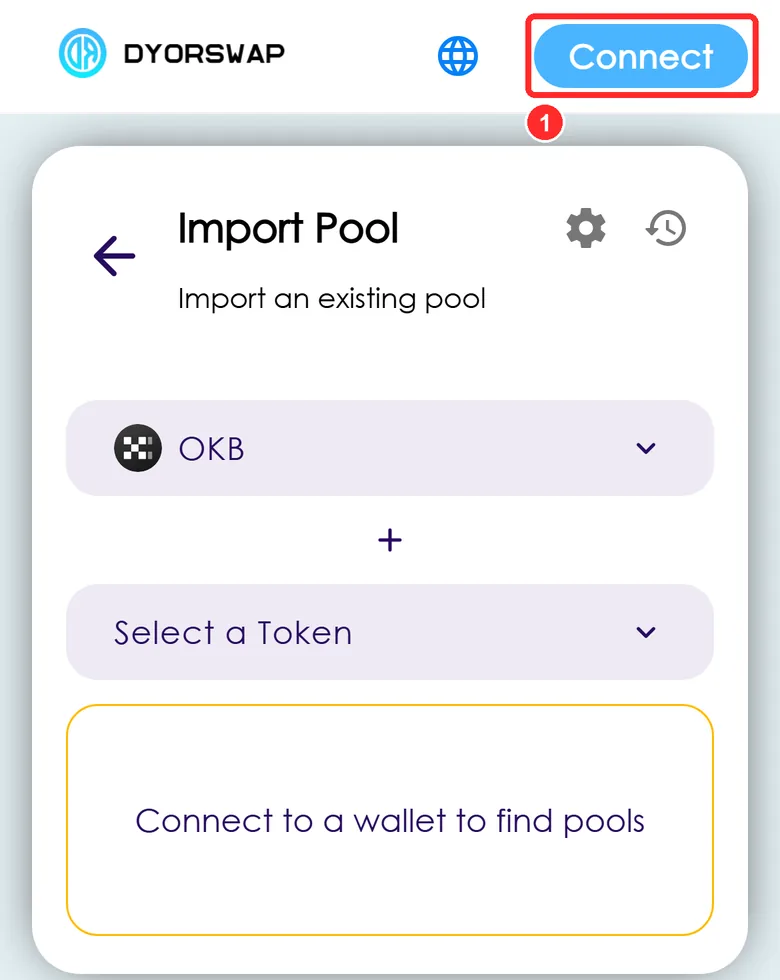
- The Import Pool page opens. Tap Connect at the top right
Only tap what's boxed in the pictures. Don't tap Bridge in the bottom bar: withdrawing doesn't need it, and in September 2026 users lost funds through a fake bridge on DYORSwap
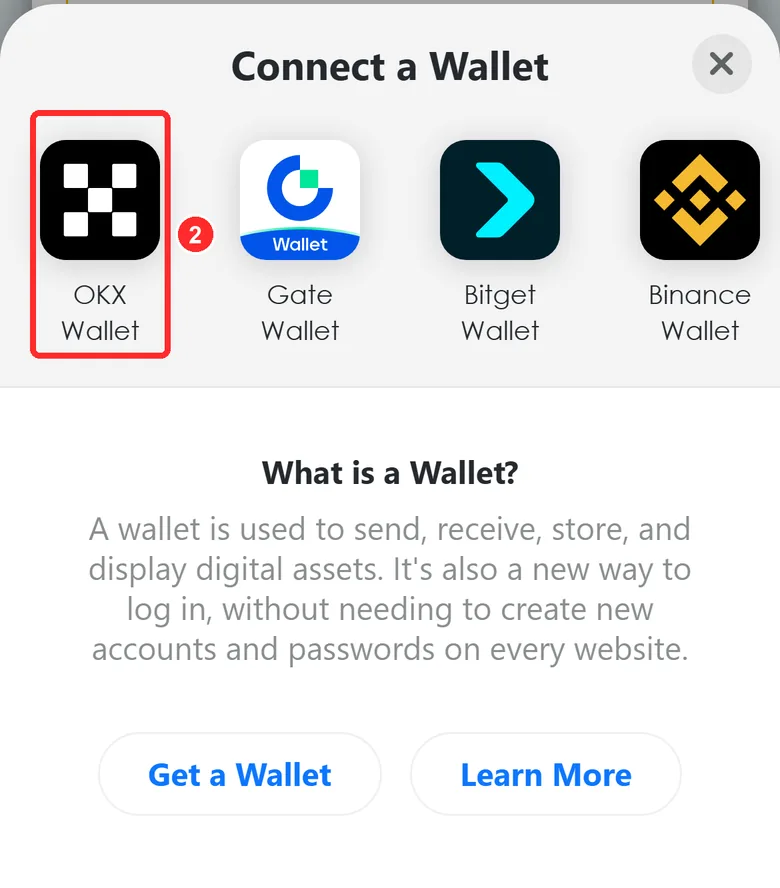
- Tap OKX Wallet. When the wallet asks to connect, check that it says dyorswap.finance, then connect
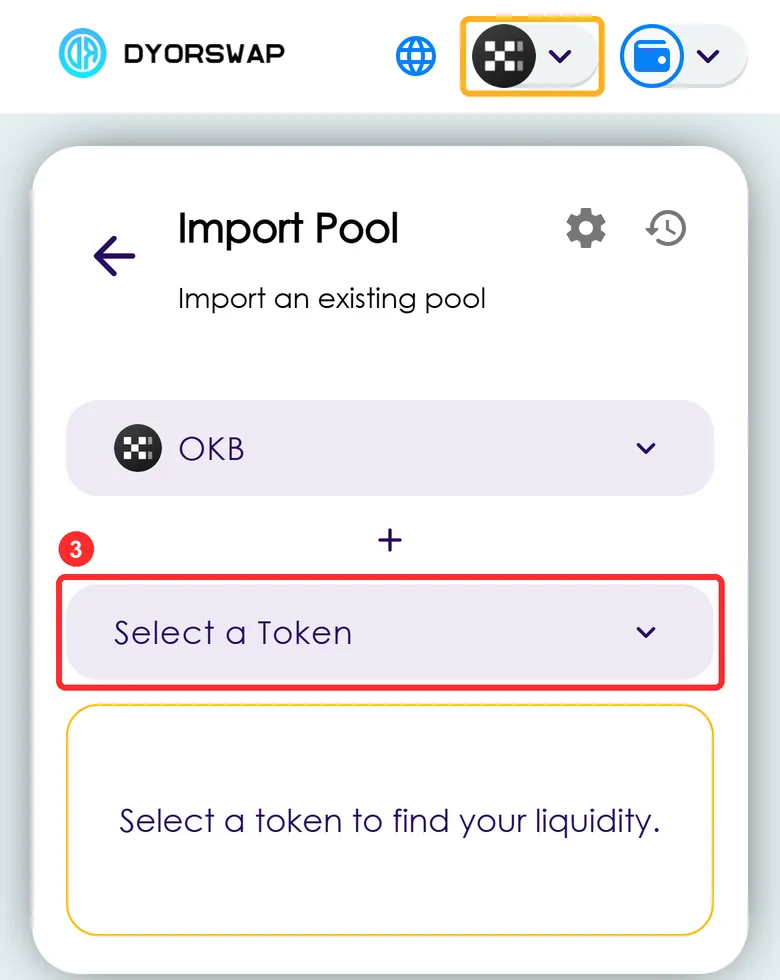
- Once connected, check the yellow box first: the icon at the top right must be the black-and-white checkerboard, which means X Layer. If not, see the common situations below. If it is, tap Select a Token
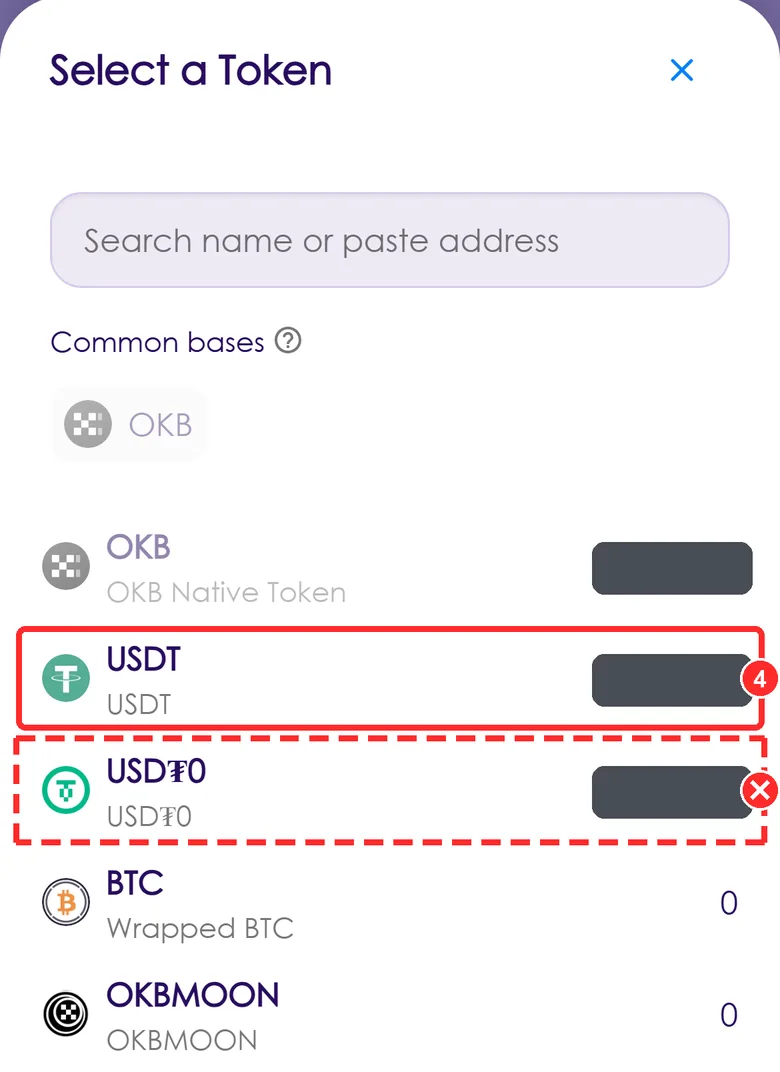
- Tap USDT in the list
Don't tap USD₮0 below it: that's a different token, and this pool uses USDT. The balances in the picture are hidden
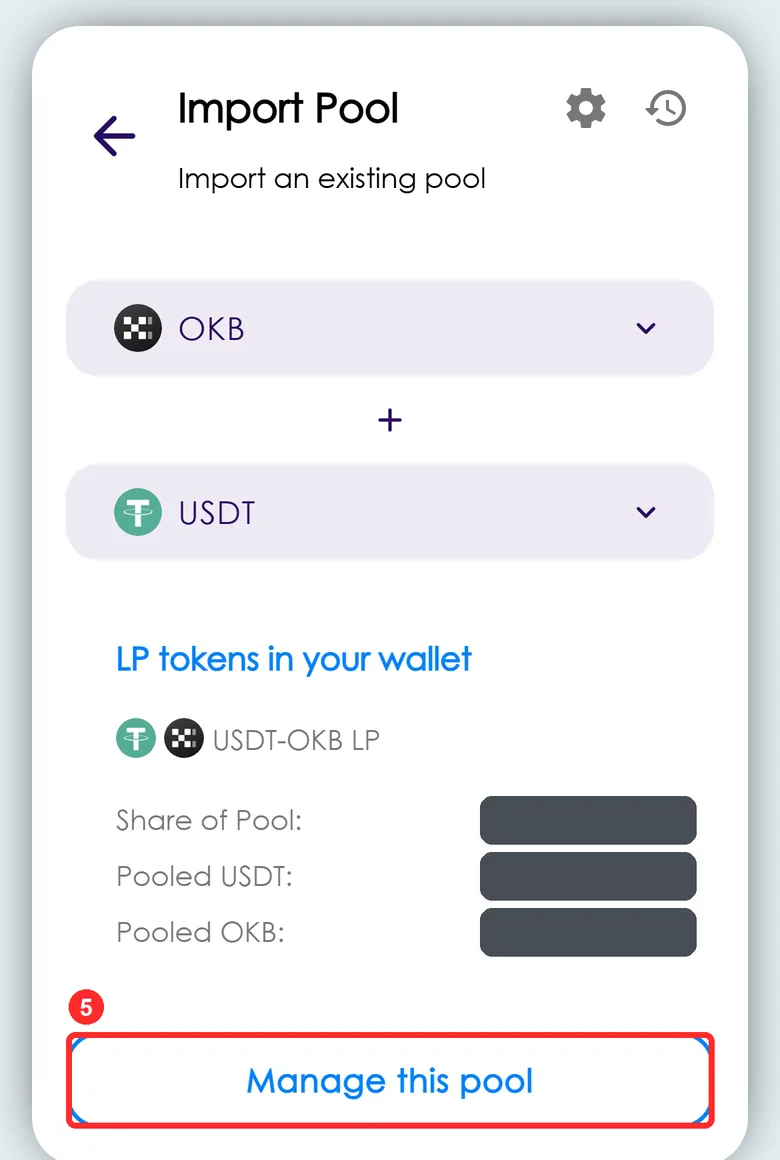
- A USDT-OKB LP block appears: that's your liquidity. Tap Manage this pool. The numbers in the picture are hidden
There's no Connect button, just a wallet icon
You're already connected. Check that the icon to its left is the black-and-white checkerboard (X Layer), then tap Select a Token.
You are in wrong network pops up, or the icon at the top right isn't the checkerboard
Your wallet is on another network, so your pool won't show up. Tap Switch to X Layer mainnet. If nothing pops up, tap that icon and pick X Layer mainnet in the network list.
The wallet asks you to switch networks
Switch to X Layer. That's a switch, not a new network. If it asks you to add any other network, reject it: DYORSwap had a fake chain incident in September.
After picking USDT, no USDT-OKB LP block appears
Check that the icon at the top right is the checkerboard (X Layer) and the wallet is on the account that added the liquidity, and give the page a few seconds to read the chain. Still nothing? Tap Stuck? at the top right: we check this address's LP on chain directly.
I picked USD₮0 by mistake
Tap the second box and pick USDT.
It says No pool found, with Create pool below
Wrong token: that pair has no pool. Don't tap Create pool. Tap the second box and pick USDT.
The page says No liquidity found
Your money isn't lost: this pool isn't in the site's default list. Tap Find other LP tokens, then Select a Token, and pick USDT.
I ended up on a bridge page: it has a Send button and tabs like Bridge, Deploy, Referral
Don't tap Send and don't sign anything. This isn't the way out. Close the page and reopen it from step 1. As long as you didn't sign or confirm anything, your money hasn't moved.
Set slippage to 1%
Skip this and the withdrawal fails later
- When you withdraw from this pool it settles a protocol fee first, so you actually get slightly less than the site estimates. The default 0.5% slippage isn't enough and the transaction fails, so change it to 1% first. This comes from an on-chain simulation, not a guess.
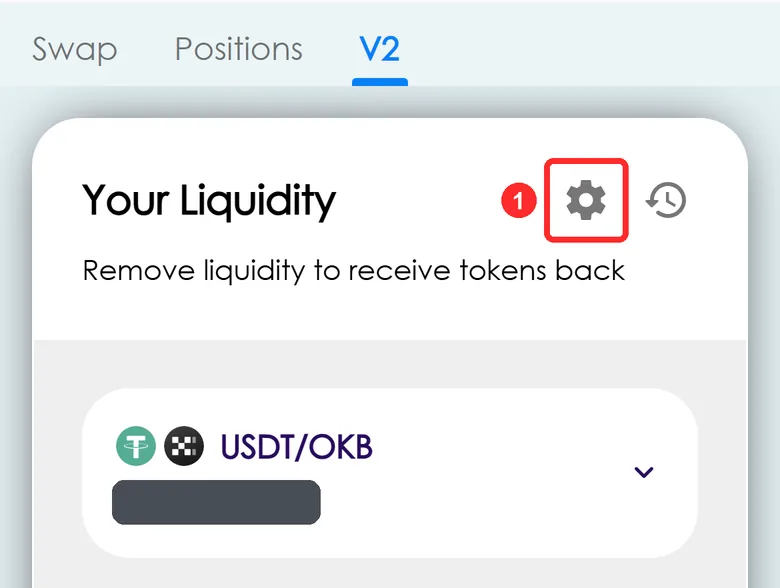
- Back on Your Liquidity, USDT/OKB is now in the list. Tap the gear at the top right. The numbers in the picture are hidden
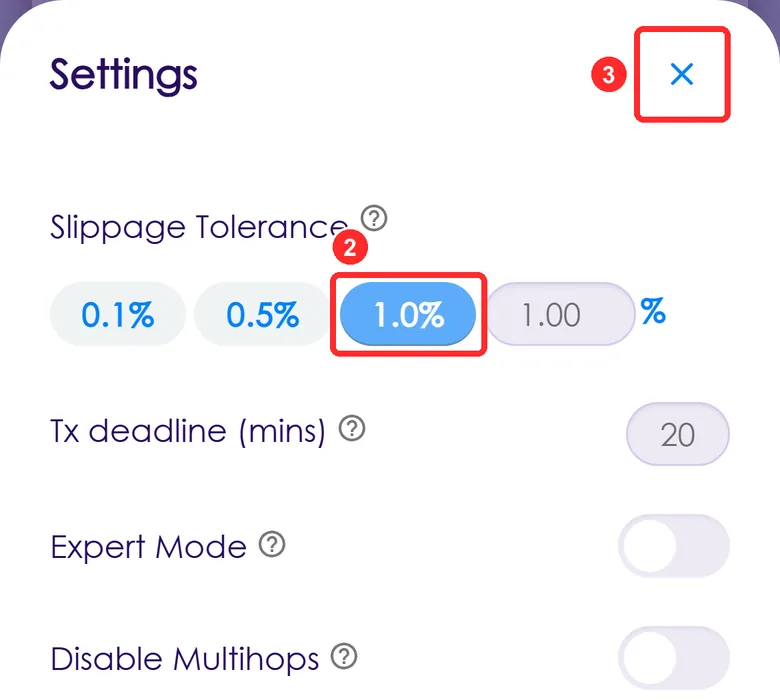
- Tap 1.0% so it turns blue
- Tap × at the top right to close
Is 1% safe?
Slippage is how much less than the site's estimate you'll accept. At 1%, up to 1% less is fine; this withdrawal is about 0.5% less. Anything worse and the transaction just fails, and your money stays put.
There's an Expert Mode switch below
Leave it off. This guide doesn't need it.
I can't find the gear
The withdraw page has no gear. Go back to Your Liquidity with the back arrow at the top left of the withdraw page.
Pick Max and sign
This step grants permission; it doesn't move funds by itself After you sign, DYORSwap's router contract can take your liquidity tokens (LP): exactly the amount you're withdrawing now, not an unlimited amount. Check the card line by line, and tap Reject if anything doesn't match.
Signing is free and only covers the LP you're withdrawing
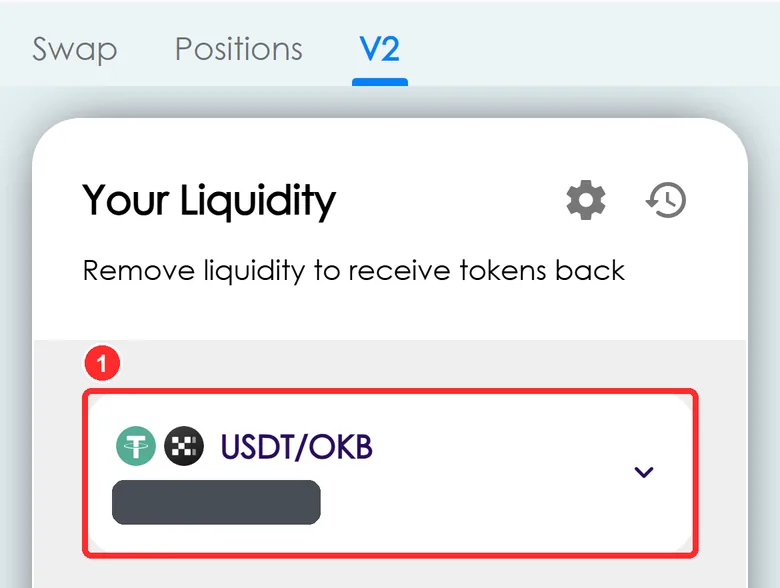
- Tap the USDT/OKB row to expand it. The numbers in the picture are hidden
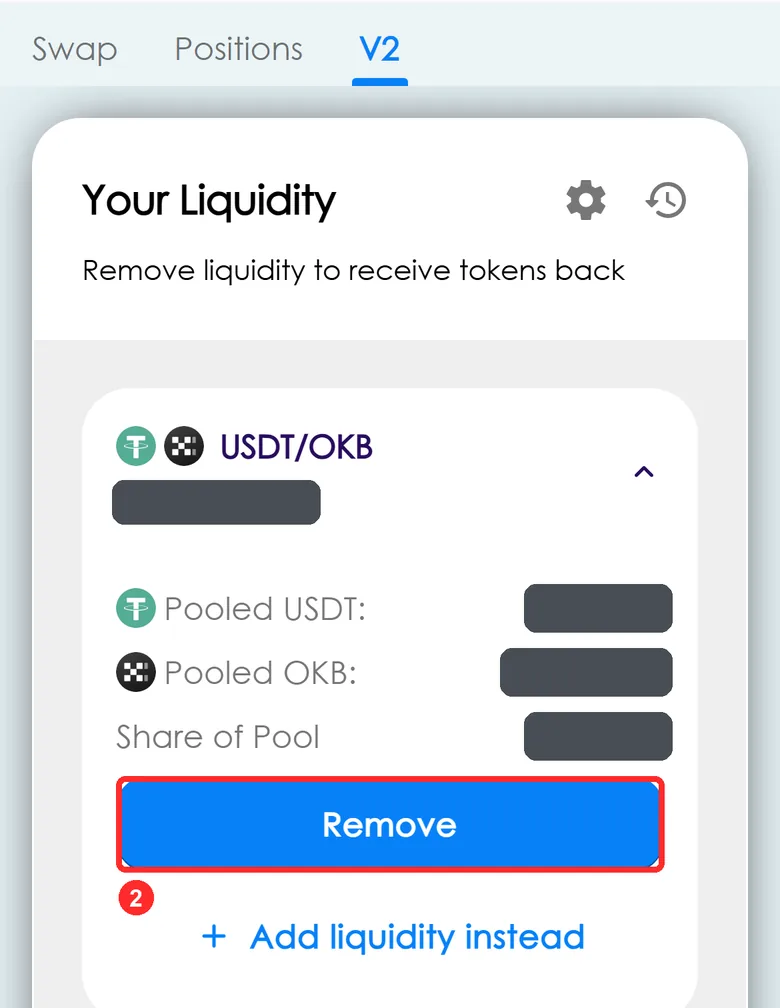
- Tap Remove
Don't tap Add liquidity instead. The numbers in the picture are hidden
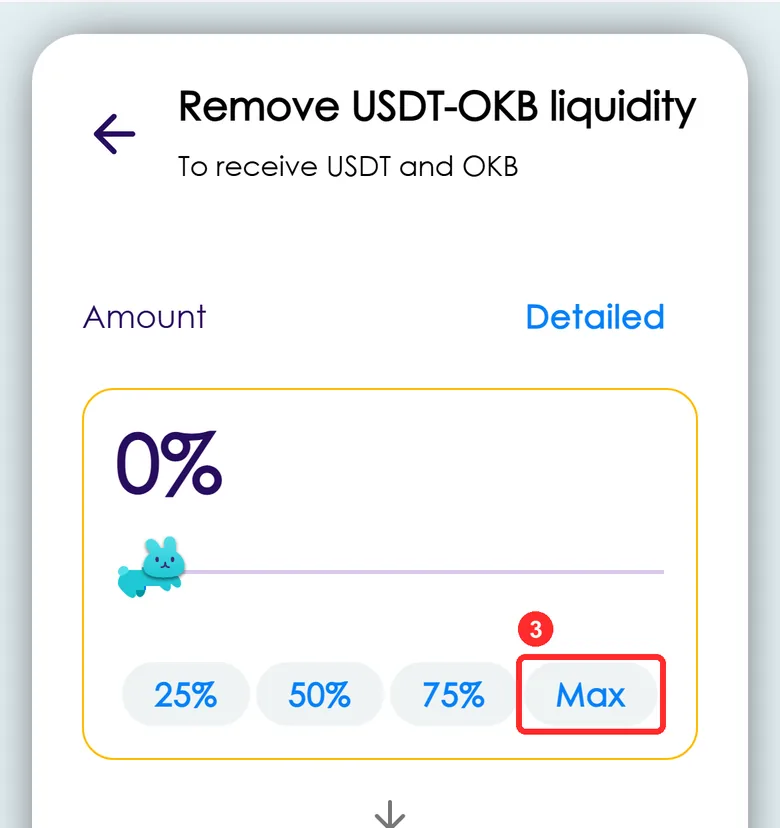
- Tap Max: 0% changes to 100%
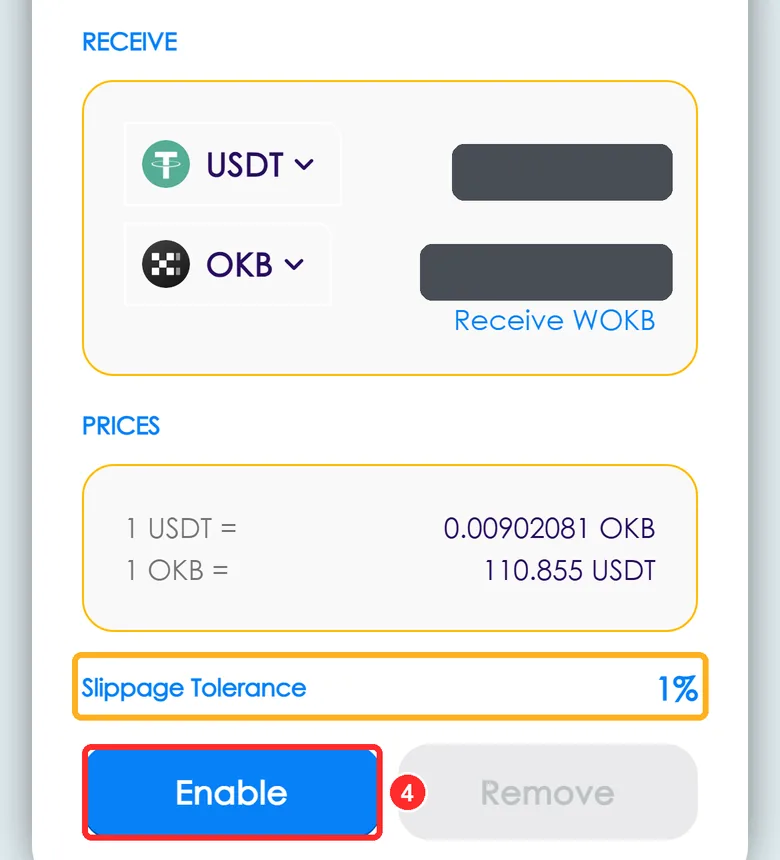
- Scroll to the bottom and check the yellow box first: Slippage Tolerance must say 1%. Then tap Enable. Your wallet shows a signature request: compare it with the check card below. The numbers in the picture are hidden
Before you confirm, check 3 things
This is the signature request from your wallet. There's no picture of this pop-up yet: go by what it says, and tap each item once you've checked it.
See any of these? Tap Reject right away
- It approves USDT, OKB or another token instead of the LP
- The spender doesn't match 0x1E690F24…FC04c46036
- The amount says unlimited
- The source isn't dyorswap.finance
- It says transfer, or asks you to send tokens
- The wallet shows a red warning: high risk or malicious site
These are normal
- Signing costs no fee and moves no money
- The amount is a short, small number: LP units are tiny
- If the wallet only shows the first and last characters, match those; open the details to see it all if you can
The yellow box still says 0.5%
Don't tap Enable yet. Use the back arrow at the top left of the withdraw page to return to the list, set 1% as in step 3, then come back.
Enable brought up a transaction instead of a signature
Tap Reject. Some wallets can't do this kind of signature, so the site sends an approval transaction instead. We haven't checked that path. Tap Stuck? at the top right and send us the report.
I tapped Reject by mistake
Your money hasn't moved. Tap Enable again.
The signature approves another token or another address
Tap Reject right away.
Withdraw
This step moves your funds After you sign in your own wallet, DYORSwap's contract carries it out. DeFiExit never touches your money.
This is the only transaction
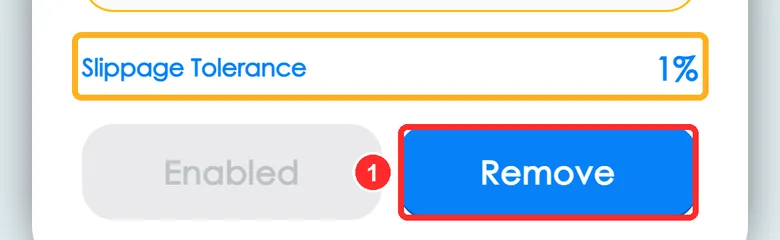
- The left button turns grey and says Enabled. Tap Remove on the right
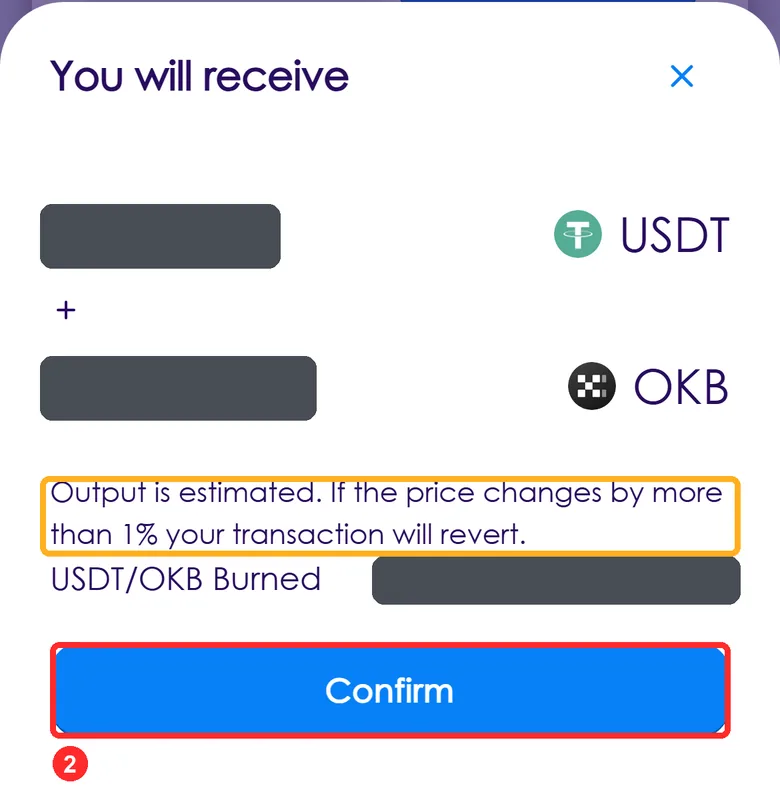
- You will receive opens. The yellow box must say 1%. Tap Confirm, and your wallet shows the transaction: compare it with the check card below. The numbers in the picture are hidden
Before you confirm, check 3 things
This is the transaction from your wallet. There's no picture of this pop-up yet: go by what it says, and tap each item once you've checked it.
See any of these? Tap Reject right away
- It asks you to send OKB, USDT or another token
- The interaction address doesn't match 0x1E690F24…FC04c46036
- The source isn't dyorswap.finance
- It says Approve
- The wallet shows a red warning: high risk or malicious site
These are normal
- You get about 0.5% less than the site says: that's normal, this pool settles a fee first and the site's estimate leaves it out
- If the wallet only shows the first and last characters, match those; open the details to see it all if you can
- The page spins and says Waiting For Confirmation: it's waiting for you to confirm in the wallet
- After confirming you'll need Face ID, a fingerprint or your password
A red Error says This transaction would fail
Your money hasn't moved. Slippage is most likely still 0.5%: tap ×, use the back arrow at the top left of the withdraw page to return to the list, set 1% as in step 3, and withdraw again (you'll need to sign again). Already at 1%? Tap Stuck? at the top right.
I tapped Reject by mistake
Your money hasn't moved. Tap Confirm again.
I confirmed and it keeps spinning
Wait a minute and don't tap again. Then tap Stuck? at the top right: we check the chain for withdrawals from the last few minutes.
It says the fee or balance isn't enough
You need a little OKB on X Layer for the fee (under $0.01). Send a little OKB to this address on X Layer first (0.001 is plenty), then come back.
The interaction address isn't 0x1E690F24…FC04c46036
Tap Reject right away.
It asks you to send OKB or USDT
Tap Reject right away. Withdrawing means you receive money; you don't send these tokens.
Check it arrived
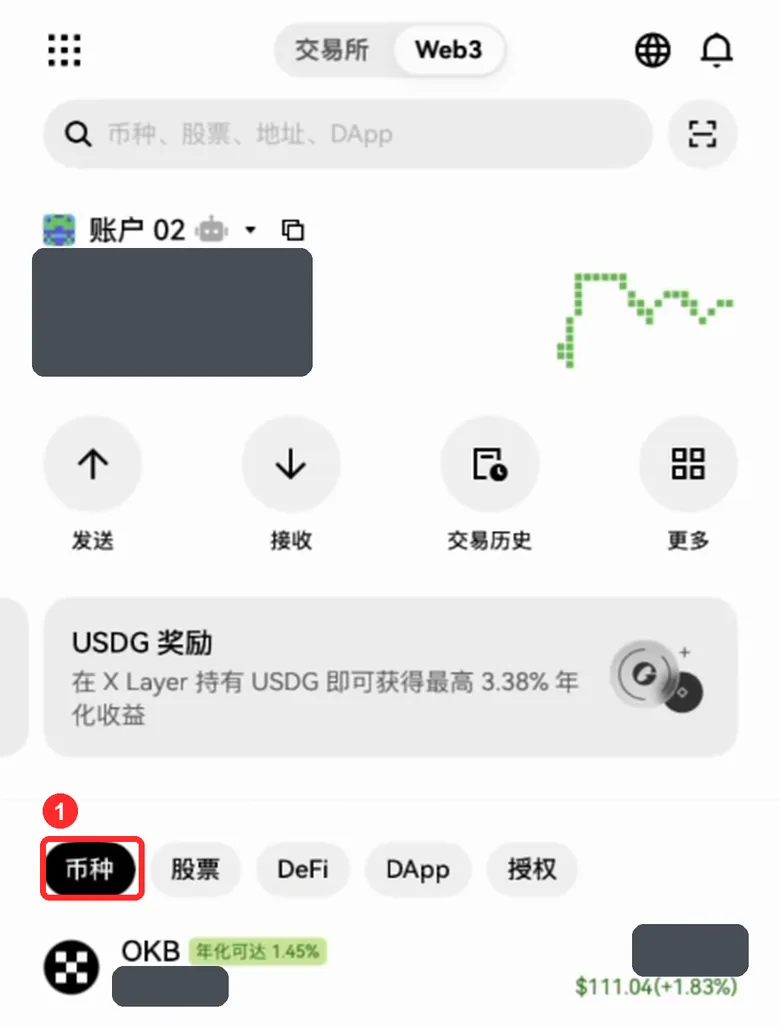
- Back on the wallet home (the OKX icon at the bottom), tap the tokens tab: you have more OKB, and your USDT is back. The balances in the picture are hidden
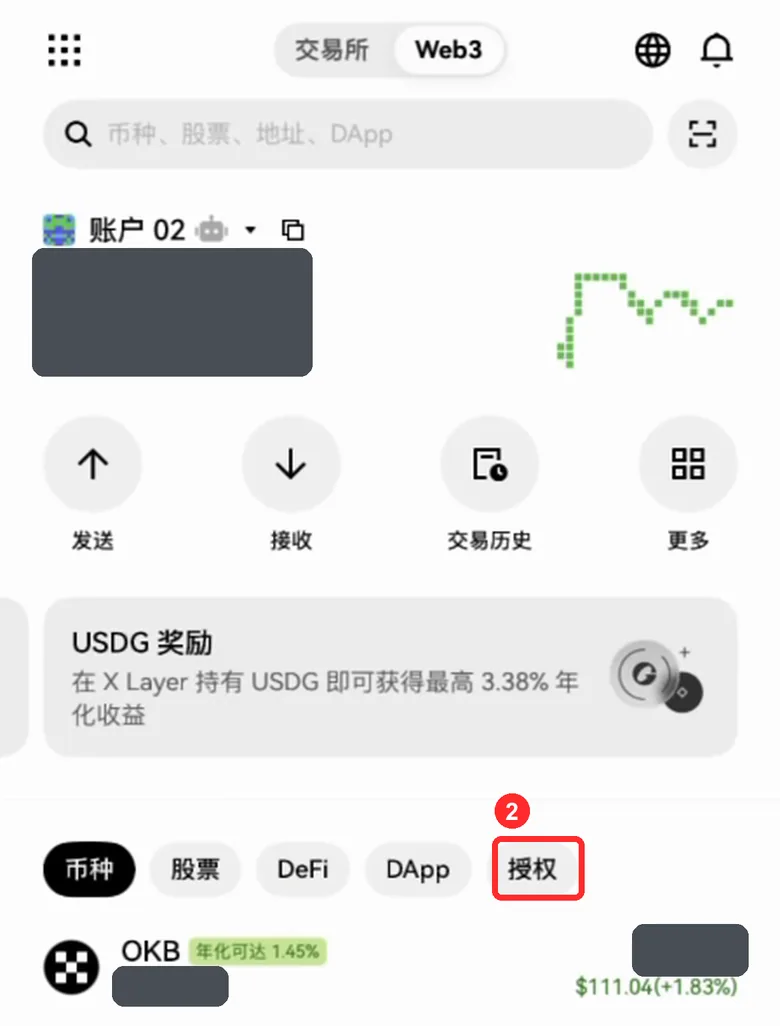
- To finish, tap the approvals tab, the last one in that row, find the USDT approval for DYORSwap (0x1E69…6036) and cancel it. You gave it when adding liquidity and don't need it now. It costs a small fee, and your money is safe either way
Check it arrived
- How long
- A few seconds after you confirm
- Where to look
- OKX app wallet home → OKB and USDT → transaction history
- What you should see
- what you can withdraw more
- On chain
- From DYORSwap's router contract 0x1E69…6036, received at your own address
- If it hasn't arrived
- Tap Stuck? at the top right: we check the chain for withdrawals from the last few minutes
Once it's arrived, you're done. You get OKB itself (X Layer's native token), not WOKB
Is it OKB or WOKB?
It's OKB itself (X Layer's native token), not WOKB.
Which USDT is this?
It's X Layer's old USDT (USDT_Bridged), which OKX is phasing out. To switch to the new USDT0, deposit it to the OKX exchange and withdraw it again.
It's a bit less than the site said
That's normal: about 0.5% less. This pool settles a fee first and the site's estimate leaves it out.
I can't find this approval
The wallet's list isn't always complete, so that doesn't prove it's gone. Tap Stuck? at the top right: the live check reads the chain and tells you if the approval is still active. If it's gone, there's nothing to do.