Get your OKX Boost lock back to your wallet
To join OKX Boost's Plasma X Launch you had to lock tokens on X Layer (0.5 OKB, 200 USDT0 or 200 USDG). They don't come back on their own, and a year later more than a thousand addresses still haven't taken theirs out. Open the campaign page in the OKX app, tap Unstake once, and the money goes back to your wallet.
- Transactions
- 1 ordinary transaction. No approval, no message to sign
- Fee
- Under $0.01, paid from the OKB in your wallet on X Layer
- Time
- About 2 minutes. It arrives a few seconds after you confirm
- You need
- The OKX app, switched to the account that locked the tokens, and a little OKB on X Layer for the fee
Know the drill? Everything on one card
Route: OKX app, Web3 at the top → the explore tab at the bottom (second icon) → paste https://web3.okx.com/boost/x-launch/plasma into the search box → the third-party website result → open it in the app when asked → scroll down to the staking details → the unstake button → confirm.
One transaction: unlock(bytes32 key, address token) to OKX Boost's lock contract 0xDA63…FD2b. It sends 0 OKB, needs no approval and no message signature. The key is lp:175 padded to 32 bytes with spaces; native OKB is written as the token 0xEeee…EEeE.
Your numbers: the tokens you locked (usually 0.5 OKB).
Gotchas: the web version can't connect to the wallet inside the OKX app (it says the wallet isn't supported), so always choose to open the page in the app when asked. You need a little OKB on X Layer for the fee. The contract has no deadline: it can be withdrawn any time after unlocking.
Open the campaign page in the OKX app
- First tap this link to copy it:
- Below is how it goes in the OKX app, one picture per tap. We tested the app in Chinese, so the pictures are in Chinese. If your app is in English, look for the button that does what each caption describes, and stop if you can't find it or what you see doesn't match.

- Reading this inside the OKX app? Once the link is copied, tap the × at the top left to close the page, and come back when you're done. Reading it in another browser? Just open the OKX app
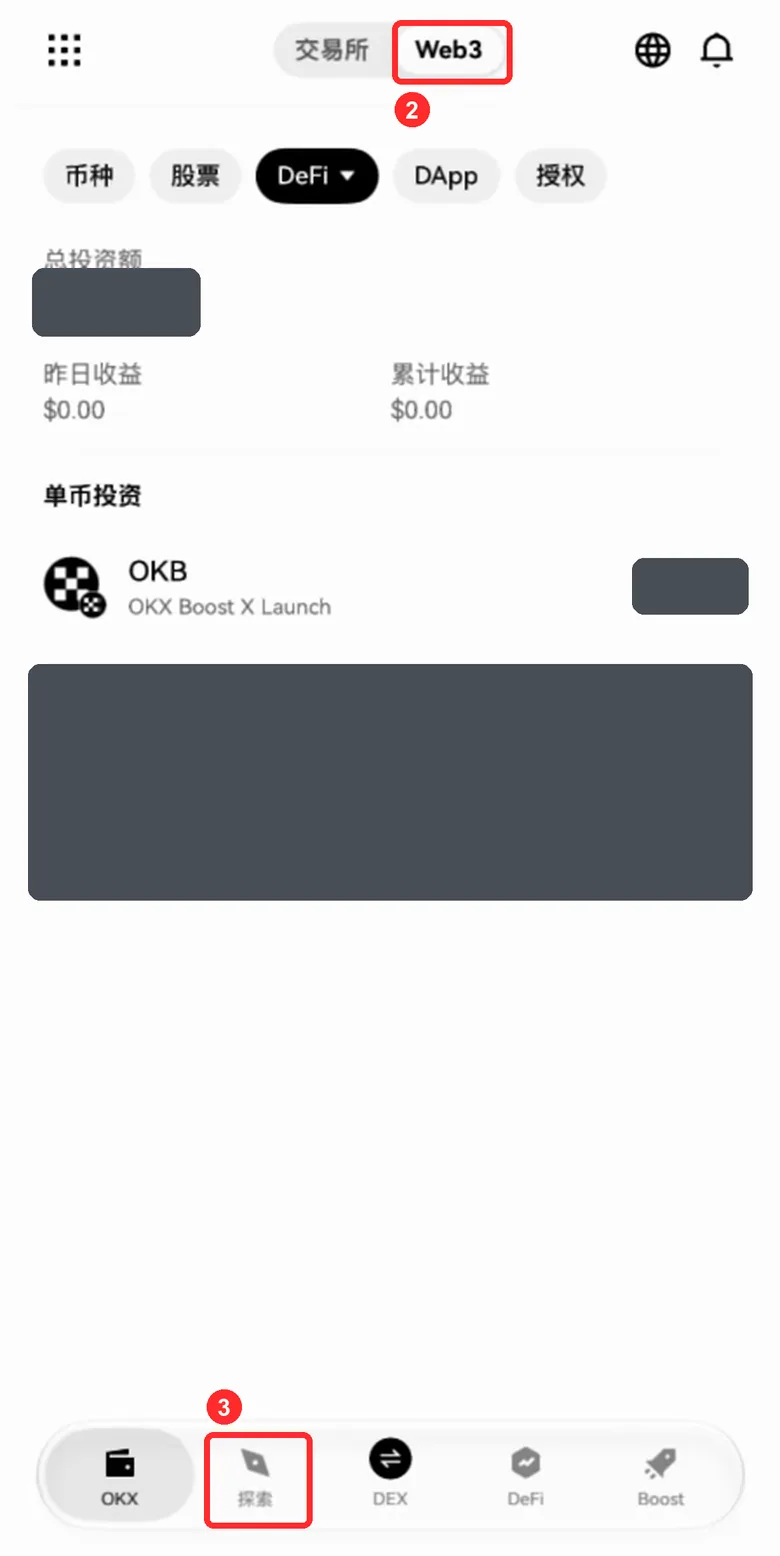
- Pick Web3 at the top
- Tap the explore tab, the second icon in the bottom bar. The amounts in the picture are hidden; the OKX Boost X Launch row under DeFi is this lock
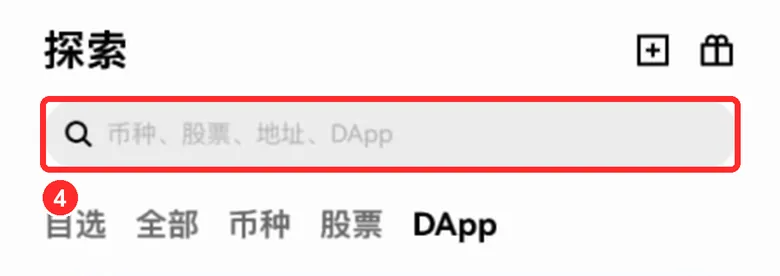
- Tap the search box at the top
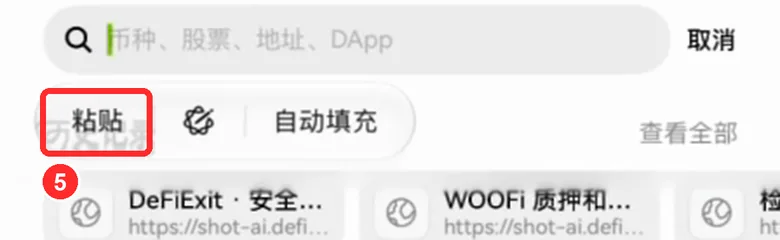
- Press and hold the search box, then tap Paste
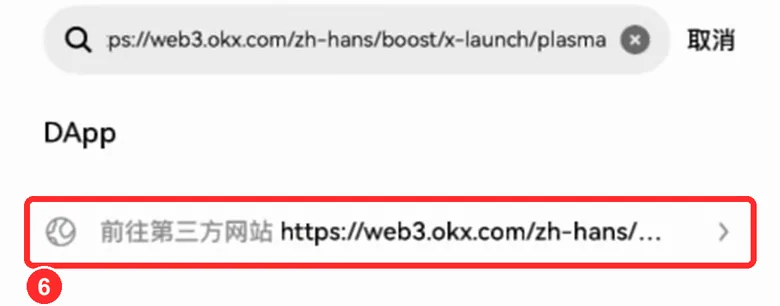
- Tap the third-party website result below it. The wallet labels every web address this way; the address after it must start exactly with https://web3.okx.com/
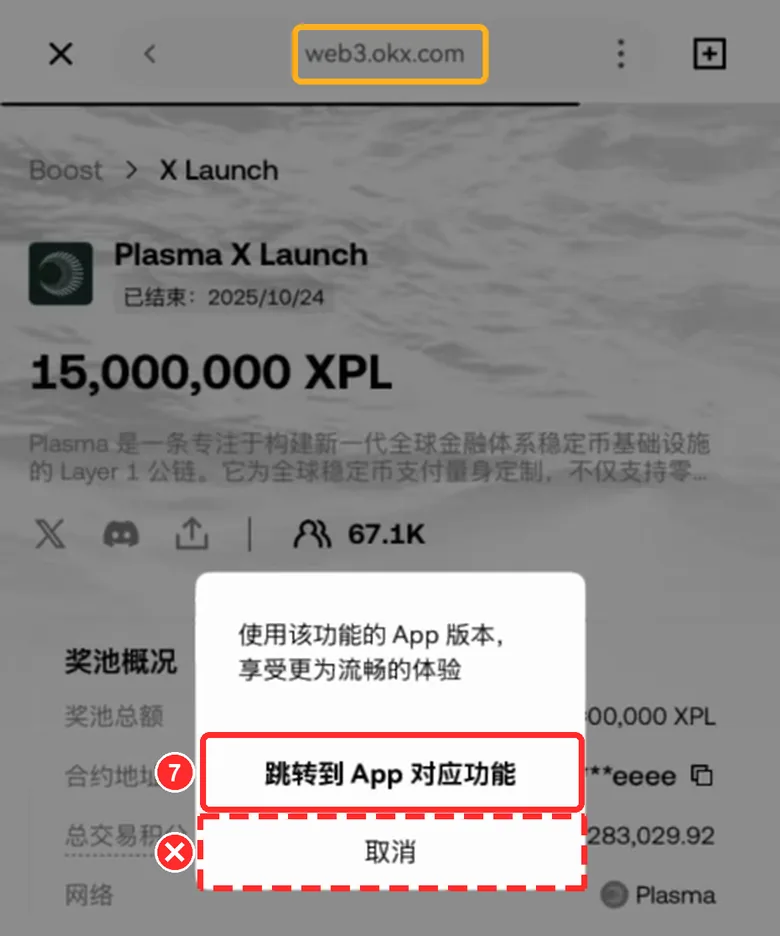
- A pop-up offers the app version: tap the first, bold button to open this feature in the app. The address bar in the yellow box must read exactly web3.okx.com, nothing before or after it
Don't tap Cancel: the web version can't connect to the wallet inside the app
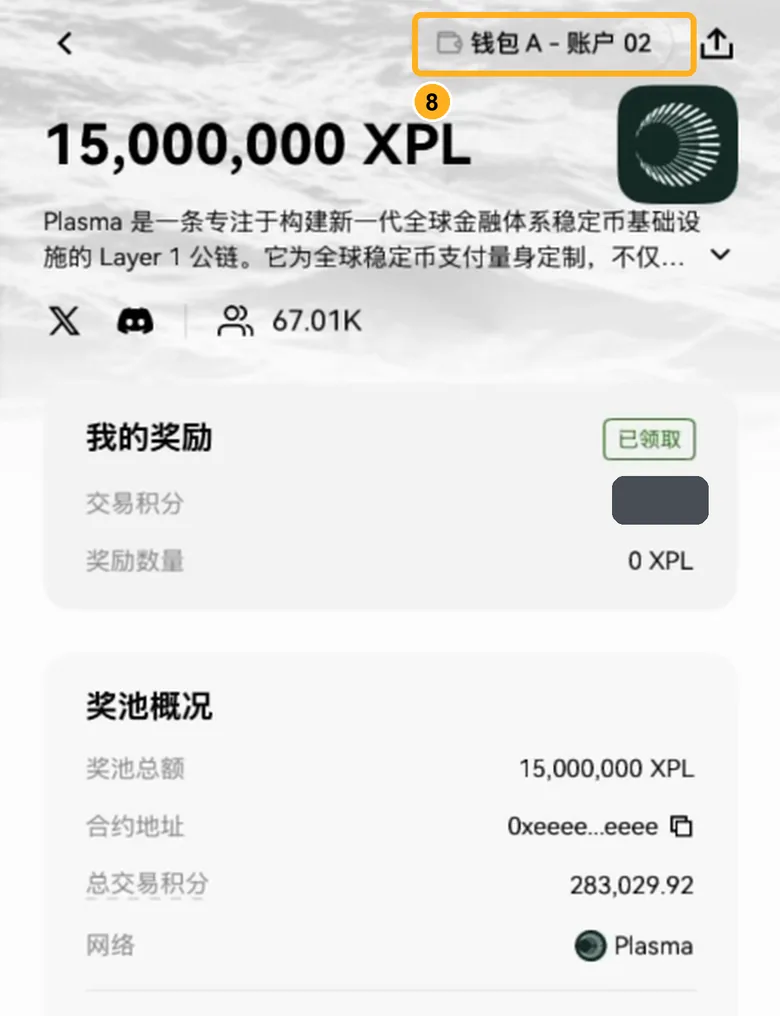
- This is the OKX app's own campaign page. The top right shows the current account, which must be the one that locked the tokens
The web version opened: an address bar saying web3.okx.com at the top and a black Connect wallet button at the bottom
The web version can't connect to the wallet inside the OKX app. Don't tap Connect wallet: close it with the × at the top left, paste the link again, and tap the bold open in the app button when the pop-up appears.
The pop-up offering the app version didn't appear
It appeared every time in our tests. If it doesn't, close the page with the × at the top left and paste the link again. If that still doesn't work, tap Stuck? at the top right and send us the report.
A message says the wallet isn't supported and asks you to switch to the OKX Wallet extension
You tapped Connect wallet on the web version. Tap Cancel, close the page, open it again as above, and choose the app version when asked. Don't tap the switch-wallet button.
A signature request from web3.okx.com that starts with Welcome to OKX Wallet
That's the web version asking you to log in, and this guide doesn't need it. Tap Reject, close the page, open it again as above, and choose the app version when asked.
The search result calls it a third-party website
That's normal: the wallet labels every web address this way. Check the address after it: it must start exactly with https://web3.okx.com/, with a slash right after okx.com and nothing extra in between.
Holding the search box doesn't show Paste
Come back to this page and tap the link again to copy it. On an iPhone, tap Allow Paste if asked. If it still doesn't work, type by hand.
The account at the top right isn't the one that locked the tokens
Go back to the wallet home, tap the small triangle next to the account name and switch to the account that locked the tokens (an OKX wallet can hold several), then open the page again. On the wrong account you won't find the staking details.
I use the OKX Wallet browser extension on a computer
We have only tested this guide in the OKX phone app. The extension's steps haven't been checked yet, so don't follow this guide on a computer for now. If this account is in the OKX app on your phone, use the app; if you're unsure, tap Stuck? at the top right and send us the report.
Unstake
This step moves your funds After you sign in your own wallet, OKX Boost's contract carries it out. DeFiExit never touches your money.
The only transaction
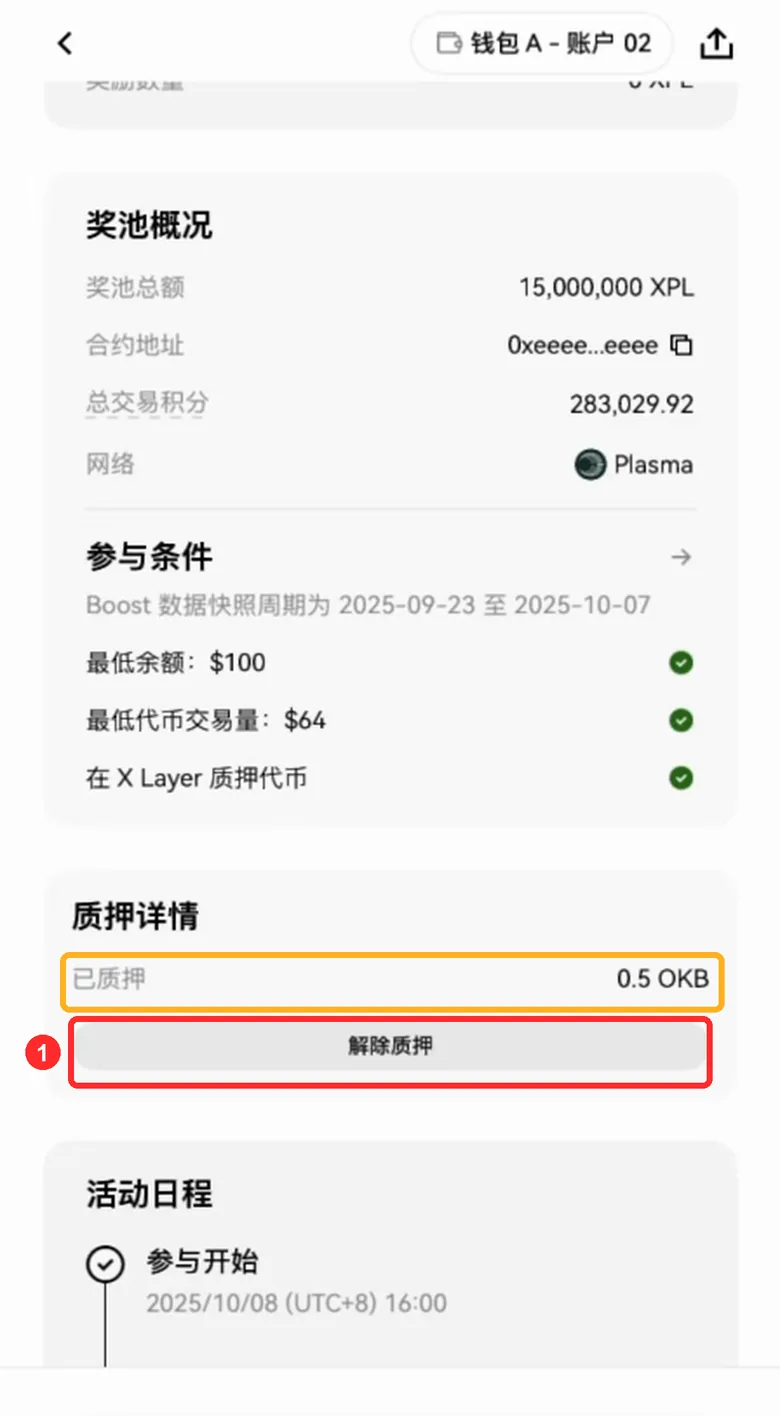
- Scroll down to the staking details (the staked line is what you locked, about the tokens you locked (usually 0.5 OKB)) and tap the unstake button below it
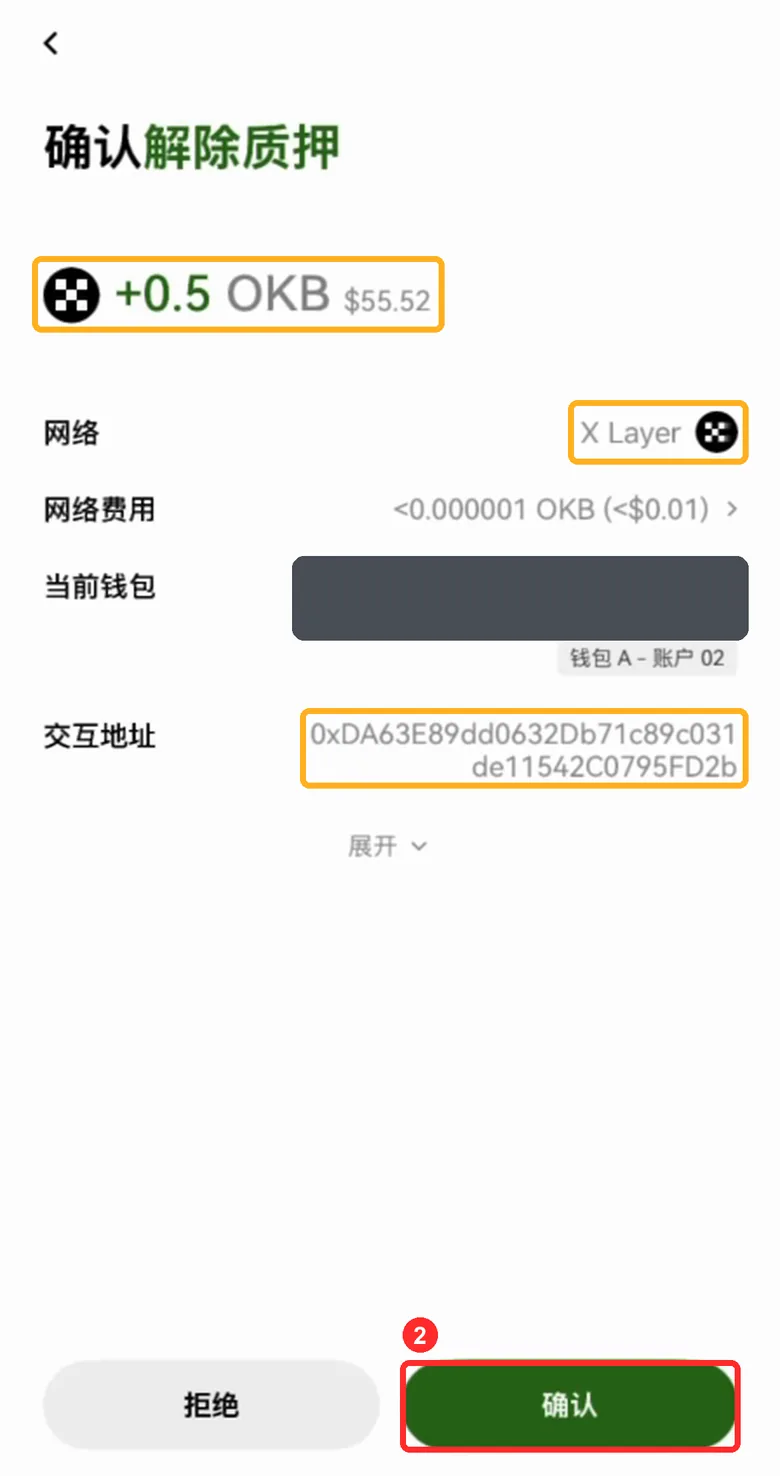
- The unstake confirmation opens. Check it against the card below first, and only when the three yellow boxes all match, tap the green confirm button. The hidden part of the picture is your own address
Before you confirm, check 3 things
This is the OKX app's own confirmation page. Check it against this list and tap each item once it matches.
See any of these? Tap Reject right away
- The amount has a minus sign, or it asks you to send any tokens
- It says Approve or Permit
- It's a signature request asking you to sign a message
- The interaction address doesn't match 0xDA63E89d…2C0795FD2b
These are normal
- The current wallet line is your own address, with your account name under it
- After you tap Confirm, the phone asks for Face ID, a fingerprint or your password
- First a transaction-confirmed message appears, then one saying the unstake succeeded
Scrolling down, there's no staking details block
This account has nothing locked in this campaign: either it's already been withdrawn or it's not the account that locked the tokens. Check the account at the top right, and tap Stuck? at the top right for a live check.
It says the fee can't be paid or the balance is too low
You need a little OKB on X Layer for the fee (under $0.01). Send a little OKB to this address on X Layer first (0.001 is plenty), then come back and tap again.
Rejected it by mistake
Nothing moved. Go back to the campaign page and tap the unstake button again.
Tapped Confirm and it keeps spinning
Wait a minute and don't tap again. Then tap Stuck? at the top right for a live check: we look at the lock contract on chain, so we can tell right away whether it came out.
It's a signature request, not the unstake confirmation
Reject it. Unstaking is an ordinary transaction and needs no message signature. You're most likely on the web version: go back to step 1 and choose the app version when asked.
The interaction address isn't 0xDA63E89d…2C0795FD2b
Reject it right away.
Check that it arrived
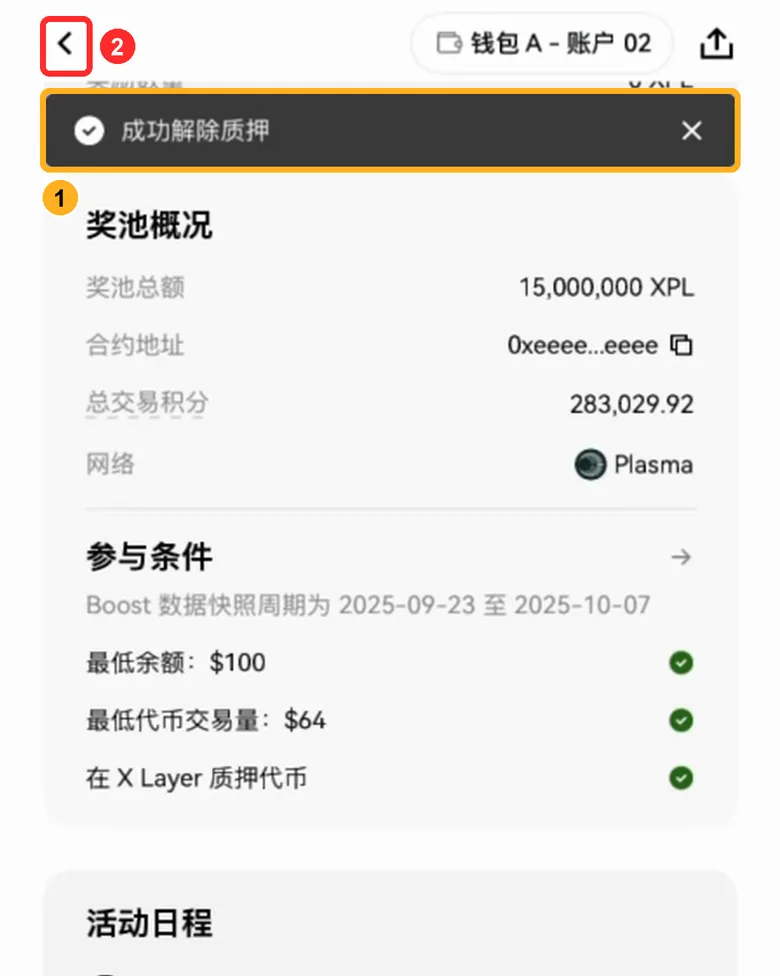
- A message at the top says the unstake succeeded, and the staking details block is gone: the money is back in your wallet
- To see it in your wallet, tap ‹ at the top left to close the campaign page, then the × at the top left of the web page
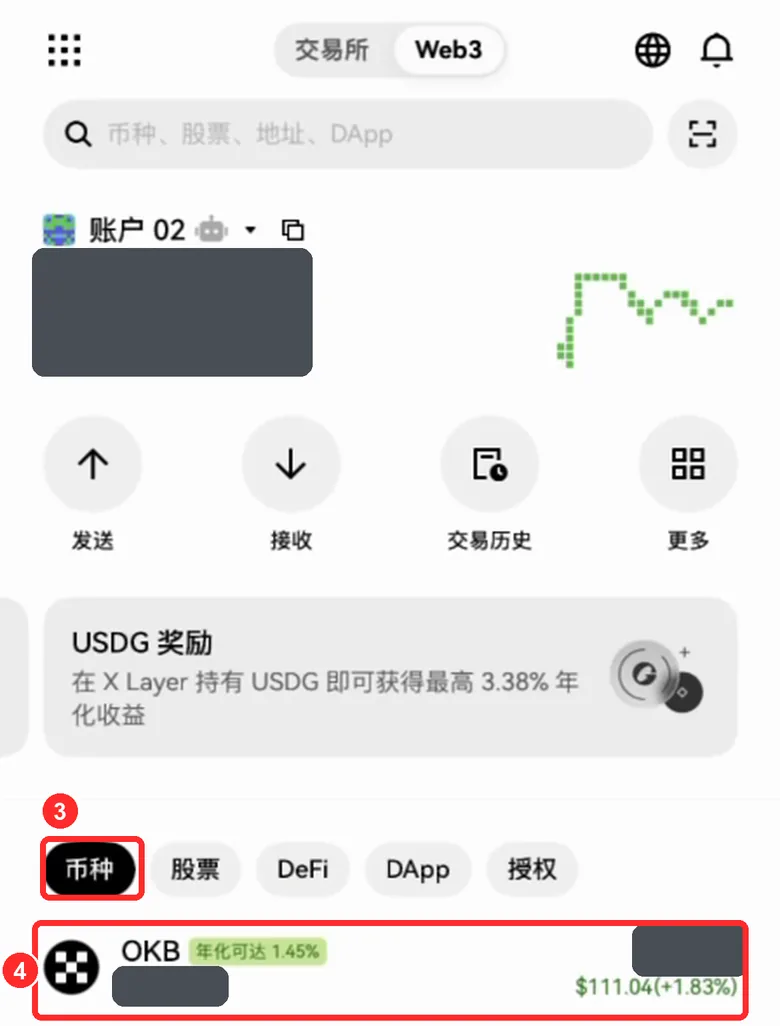
- Back on the wallet home (OKX at the bottom), open the list of your tokens
- Tap OKB (or USDT0 / USDG if that's what you locked). The balances in the picture are hidden
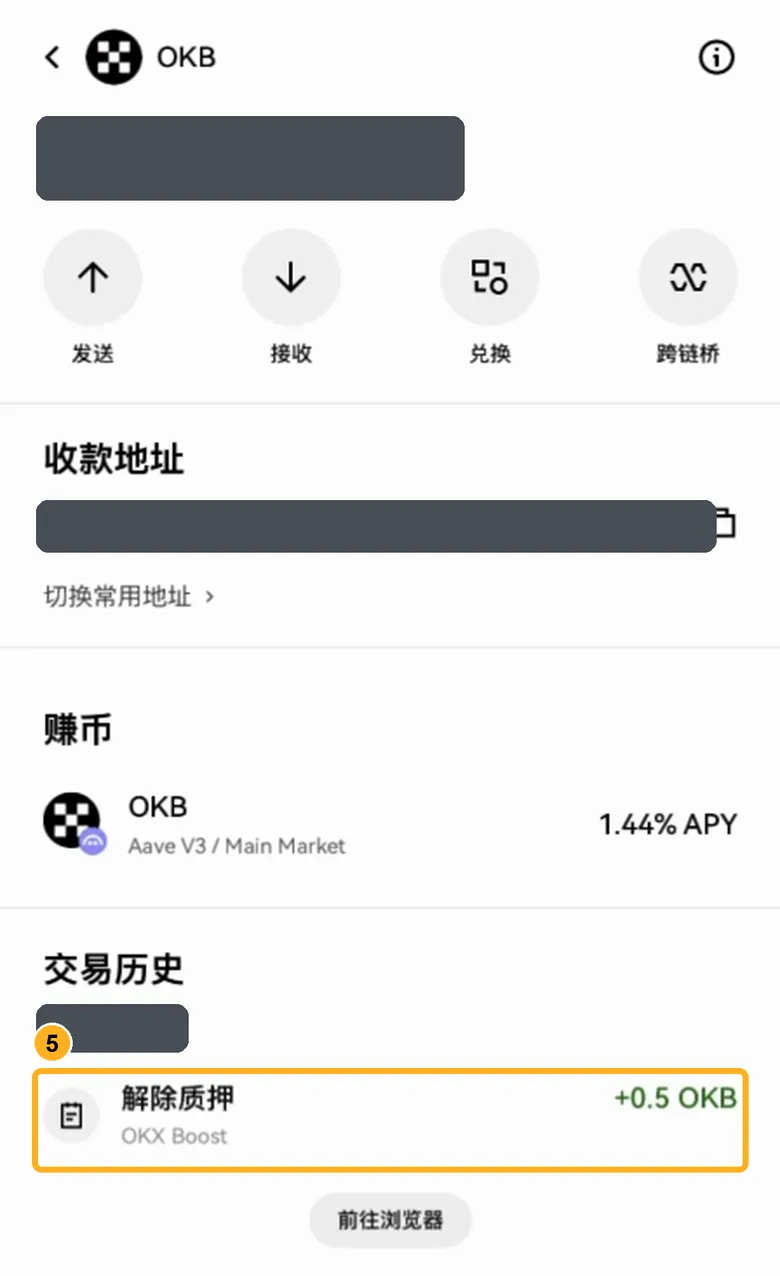
- The transaction history has a new unstake entry from OKX Boost, +the tokens you locked (usually 0.5 OKB). The balance, address and date in the picture are hidden
Check that it arrived
- How long
- A few seconds after you confirm
- Where to look
- In the OKX app, open the token you locked in your wallet and check its transaction history
- What you should see
- the tokens you locked (usually 0.5 OKB) more, in an unstake entry from OKX Boost
- On-chain record
- It comes from OKX Boost's lock contract 0xDA63…FD2b and goes to your own address
- If it hasn't arrived
- Tap Stuck? at the top right for a live check: we look at the lock contract on chain
Once it arrives, you're done. If you locked OKB, what comes back is OKB itself (X Layer's native coin), not WOKB
I locked OKB: is it OKB or WOKB that came back?
It's OKB itself (X Layer's native coin), not WOKB.
I locked USDT0 or USDG
You get back the same token and the same amount. Look for USDT0 or USDG in your wallet's asset list.
The entry isn't in the transaction history
Tap Stuck? at the top right for a live check: if your lock in the contract is 0, it's out. The wallet's history sometimes takes a little while to show it.